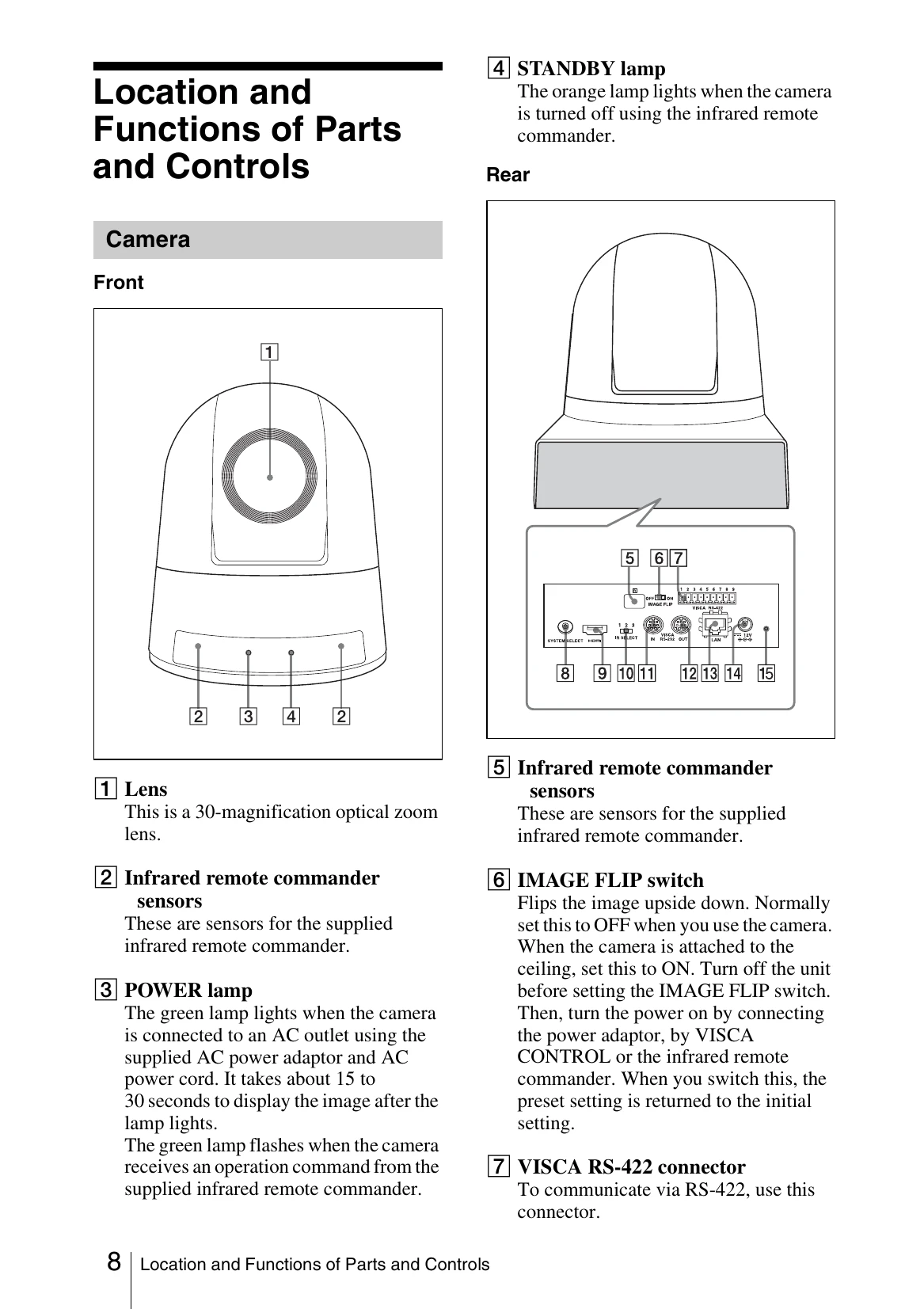
Powering On: Connect the camera to an AC outlet using the supplied power adapter and cord. The POWER lamp will illuminate, and the camera will automatically pan and tilt to the position stored in POSITION 1.
Using the Infrared Remote Commander: Point the remote at the camera. Use buttons to select cameras, adjust focus (auto/manual), control pan/tilt, zoom, and access menu settings (EXPOSURE, WHITE BALANCE, PICTURE, PAN TILT ZOOM, SYSTEM, STATUS). Preset buttons 1-6 can store and recall camera settings.
Menu Navigation: Press the DATA SCREEN button to access the main menu. Use arrow buttons to select menu items and the HOME button to enter submenus. Changes can be made using the arrow buttons.
System Configuration: The camera supports various configurations, including connection to a monitor, computer (via RS-232 or LAN), and multiple cameras controlled by IP remote controllers.