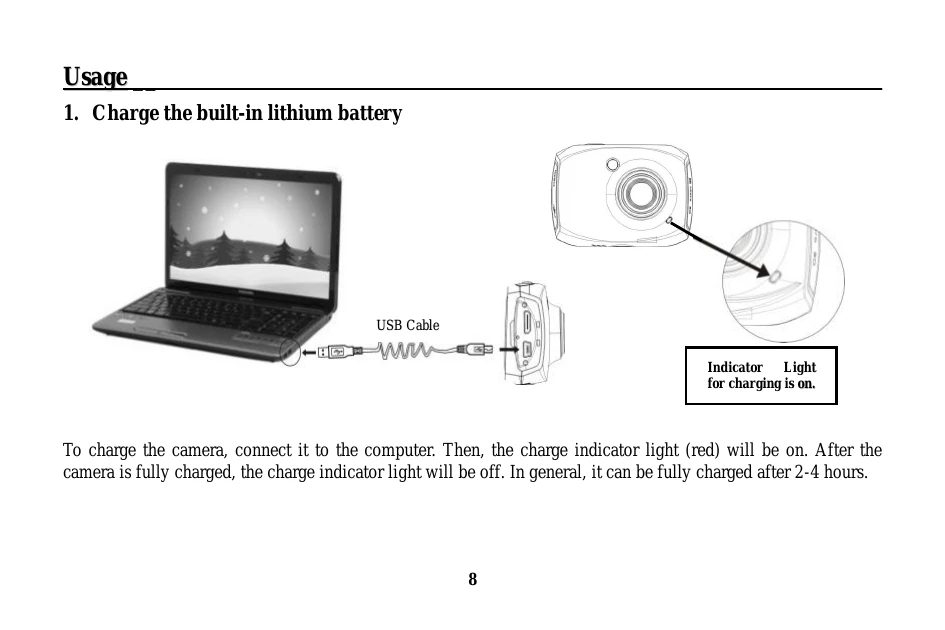
Charging the Camera: Connect the camera to a computer using the USB cable. The red indicator light will turn on, and it will turn off when fully charged (approx. 2-4 hours).
Using a Memory Card: Insert a Micro SD card into the slot until it clicks. To remove, gently push the end inward.
Startup: Press and hold the POWER button for 2 seconds.
Shutdown: Press the POWER button once.
Modes: Switch between Video Recording, Photo, Vehicle, and Playback modes by clicking the icon in the upper left corner.
Recording Video: In video mode, press the shutter button to start/stop recording.
Taking Photos: In photo mode, press the shutter button to take a picture.
Playback: Enter playback mode, select files, and use controls to play videos or view photos. Files can be deleted using the delete icon.