Manual for PCS Vision Phone VM4050

Manual for PCS Vision Phone VM4050

Brand: Sprint

Category: Mobile Phone

Document Type: Manual

Language: EN
Uploaded: Nov. 21, 2025, 8:47 p.m.

Warranty Information

12-month limited warranty covering defects in material or workmanship for the original retail purchaser.

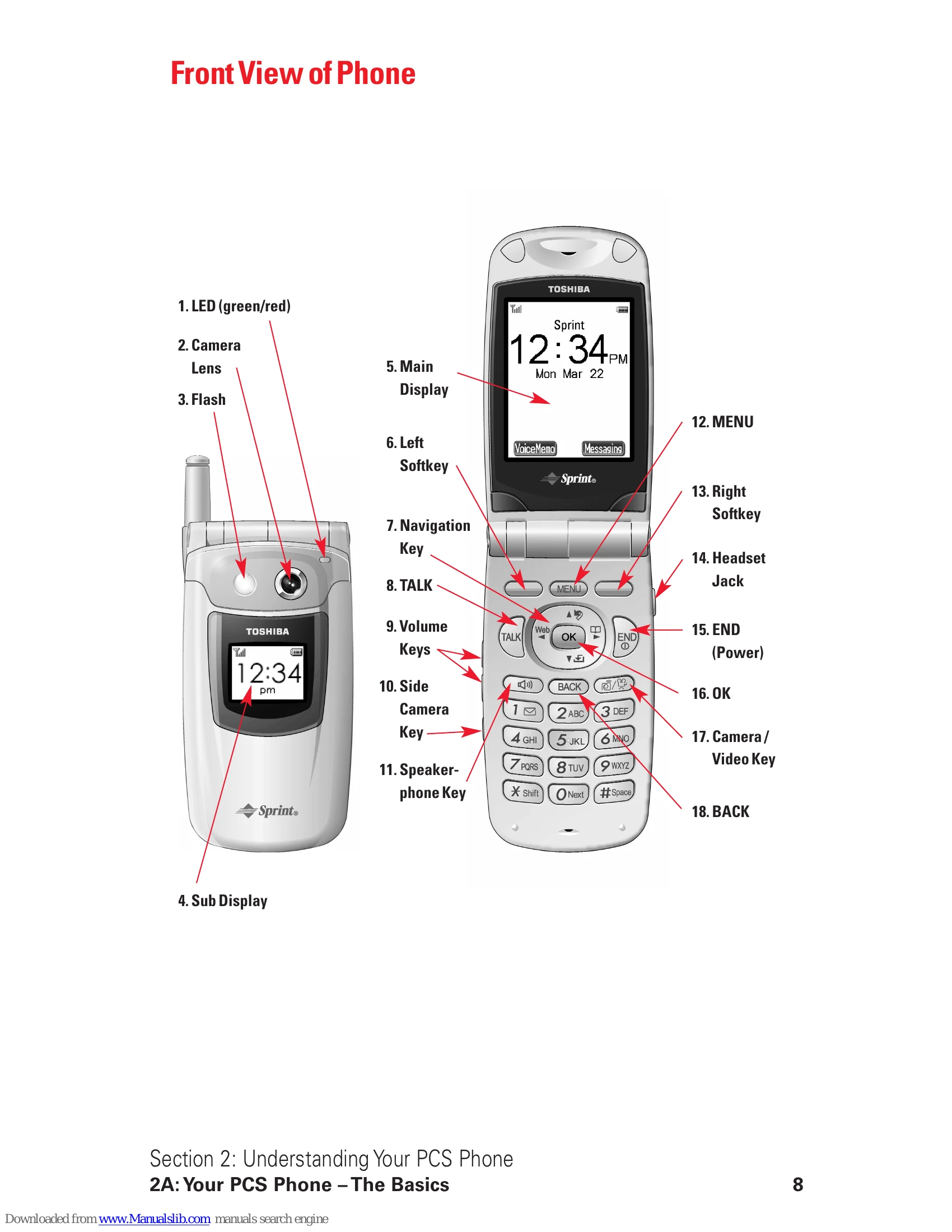
  • Turning the Phone On and Off: Press and hold the END key.
  • Making and Answering Calls: Press TALK to make or answer calls. Press END to hang up.
  • Navigation: Use the Navigation Key to scroll through menus and options. Press OK to select. Press BACK to go back.
  • Phone Book: Store and retrieve contacts using the Internal Phone Book.
  • Messaging: Send and receive text messages (PCS Mail, PCS Short Mail) and picture/video messages (Picture Mail).
  • Voice Services: Use voice commands for dialing and other functions. Access voicemail by pressing and holding 1.
  • Camera/Camcorder: Take pictures and record videos using the built-in camera.
  • Settings: Customize sound, display, security, and other phone settings via the MENU.
Privacy Policy