Brand: TOSHIBA
Category: Camcorder
Document Type: Manual
Language: EN
Brand: TOSHIBA
Category: Camcorder
Document Type: Manual
Language: EN
Uploaded: Nov. 21, 2025, 6:19 p.m.
No specific warranty period is mentioned in the provided pages.
Loading the Battery: Insert the Lithium-ion rechargeable battery according to polarity marks and close the battery cover.
Inserting/Removing SD Card: Insert or remove the SD card by pushing it into or out of the slot.
Turning On/Off: Flip out the LCD panel or press the Power Button to turn on. Flip in the LCD panel or press the Power Button to turn off.
Recording Video: Switch to Video Record mode, press the Record Button to start and stop recording.
Taking Photos: Switch to Photo Record mode, press the Record Button to capture a photo.
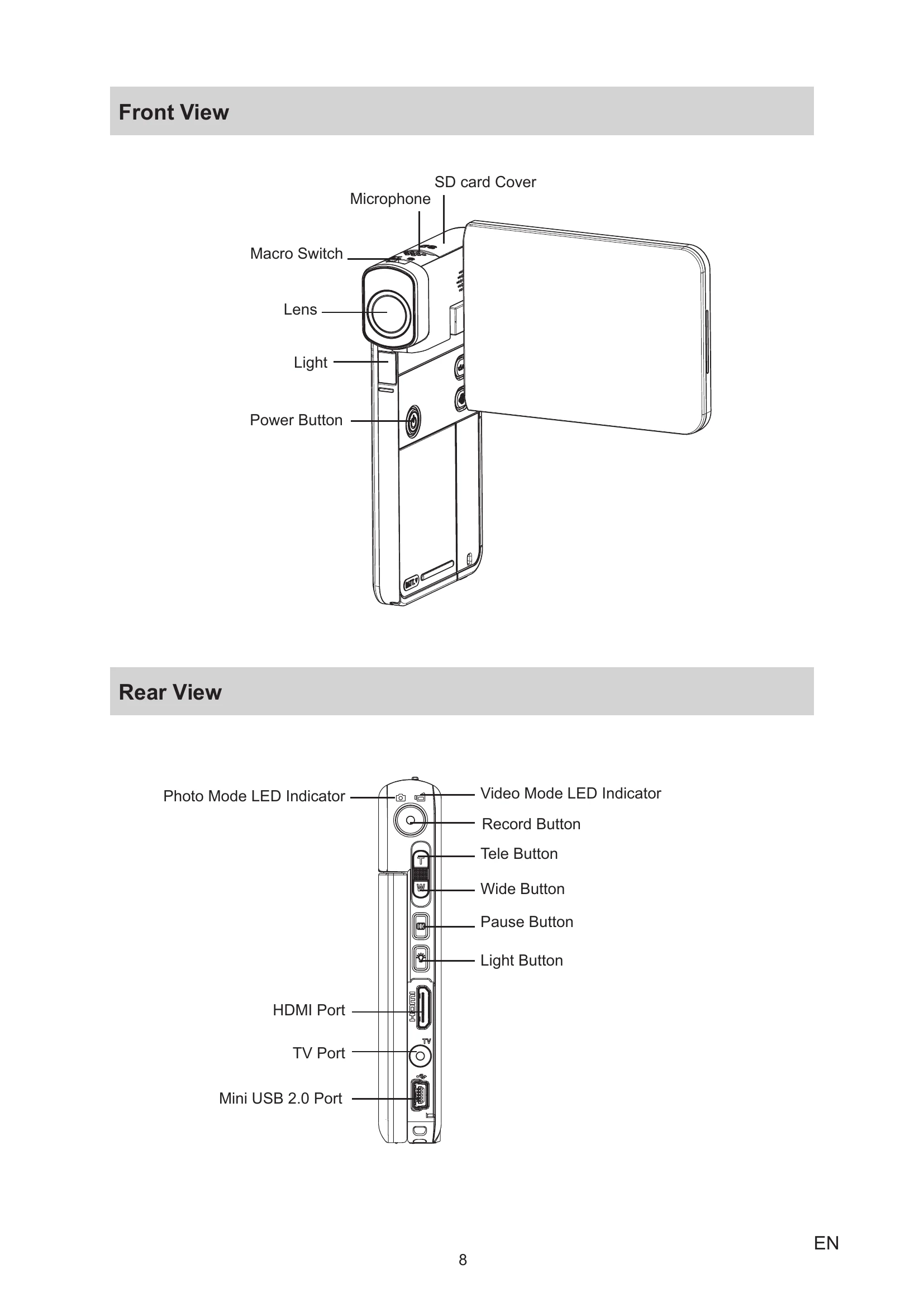
Mode Button: Switches between Video and Photo modes.
Record Button: Starts/stops video recording or takes a photo.
Tele/Wide Button: Zooms in or out.
Pause Button: Pauses and resumes video recording.
Light Button: Controls the LED light.
Macro Switch: Switches between Macro and Normal focus modes.
| Problem | Solution |
|---|---|
| If the LCD preview is not clear while shooting, how can the focus be adjusted? | Try to switch between Macro and Normal Mode. |
| The files on the memory card do not display smoothly when the LCD shows the "!" marking. | The "!" means the SD card is low speed or is having wrong content inside. Format the SD card by the camcorder or change to a high speed SD/SDHC/SDXC card. |
| Why do some of my indoor photos look blurry and dark? | Keep the camcorder and subject steady for several seconds. |
| How do I charge battery? | Use the supplied AC charger or USB cable. The camcorder must be OFF. Blinking light indicates charging; constant light indicates fully charged. |
| After connecting the USB cable to the computer... | [DV] is internal memory, [Removable Disk] is external memory (SD card), [DVAP] is CAMILEO UPLOADER application (do not format or delete). |