Brand: TOSHIBA
Category: Other
Document Type: Manual
Language: EN
Brand: TOSHIBA
Category: Other
Document Type: Manual
Language: EN
Uploaded: Nov. 21, 2025, 8:23 p.m.
Manual Publish Date: 2005-11-01
The warranty is contained in the sales contract and is the sole warranty of Toshiba International Corporation's UPS Division.
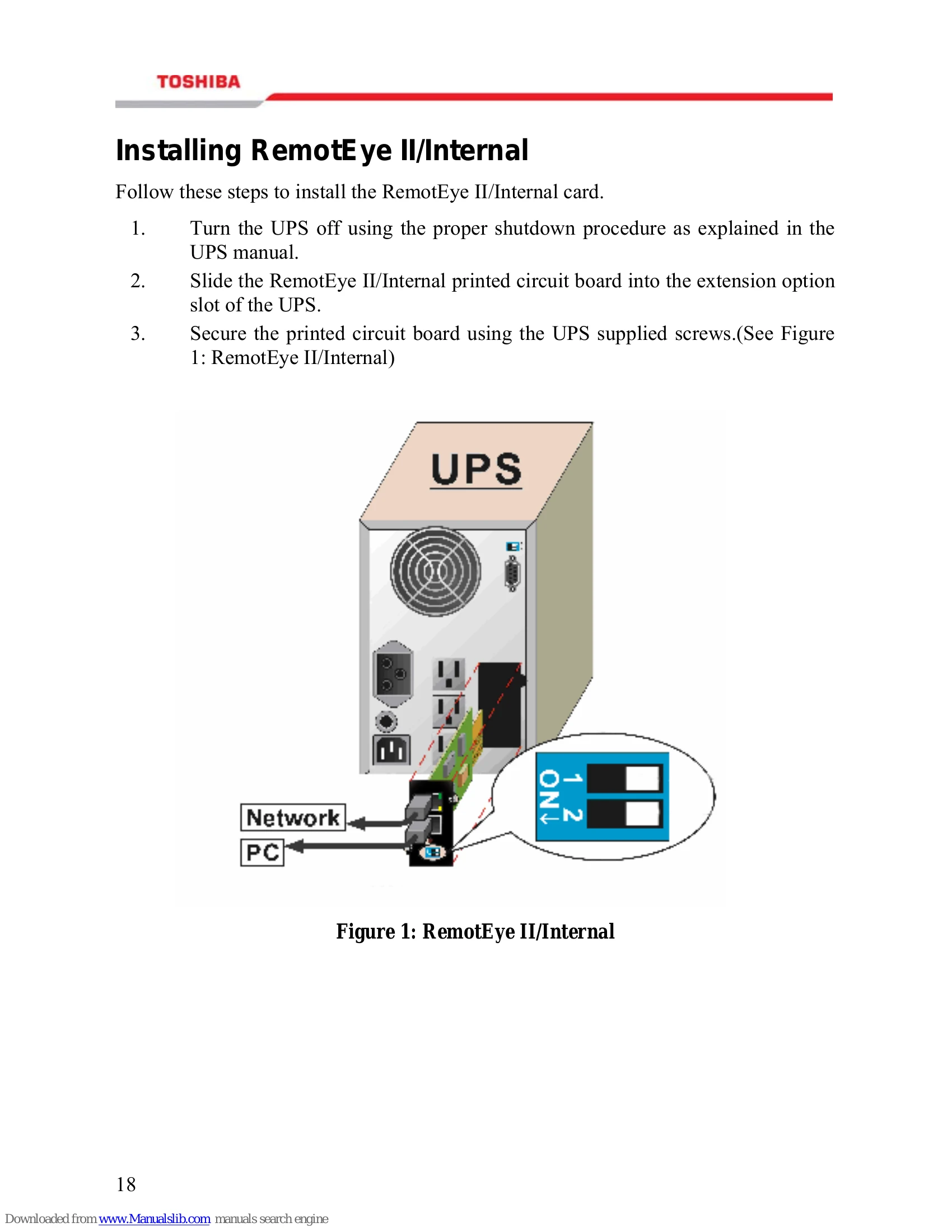
| No. | SW1 | SW2 | Function Mode |
|---|---|---|---|
| 1 | ON | ON | Manufacture Diagnostic Mode |
| 2 | OFF | ON | Reserved |
| 3 | ON | OFF | Firmware Upgrade |
| 4 | OFF | OFF | Operating Mode |
| No. | Green LED | Amber LED | Function Mode |
|---|---|---|---|
| 1 | Solid ON | Solid OFF | Normal operation |
| 2 | Flashing | Solid OFF | Ethernet traffic |
| 3 | Solid OFF | Flashing | IP address is default value |
| 4 | Solid ON | Solid ON | RemotEye II/Internal error |
| 5 | Solid OFF | Solid OFF | UPS power low |
| 6 | Flashing | Flashing | No connection to UPS |
| 7 | Solid ON | Flashing | Upgrade Mode |