Manual for USB001Z

Manual for USB001Z

Brand: TOSHIBA

Category: Other

Document Type: Manual

Language: EN
Uploaded: Nov. 21, 2025, 8:54 p.m.

Warranty Information

The unit is repaired free of charge for defects in design or workmanship within one year of delivery.

Installing the Device Driver:
  1. Use the included CD-ROM or download the latest installation file.
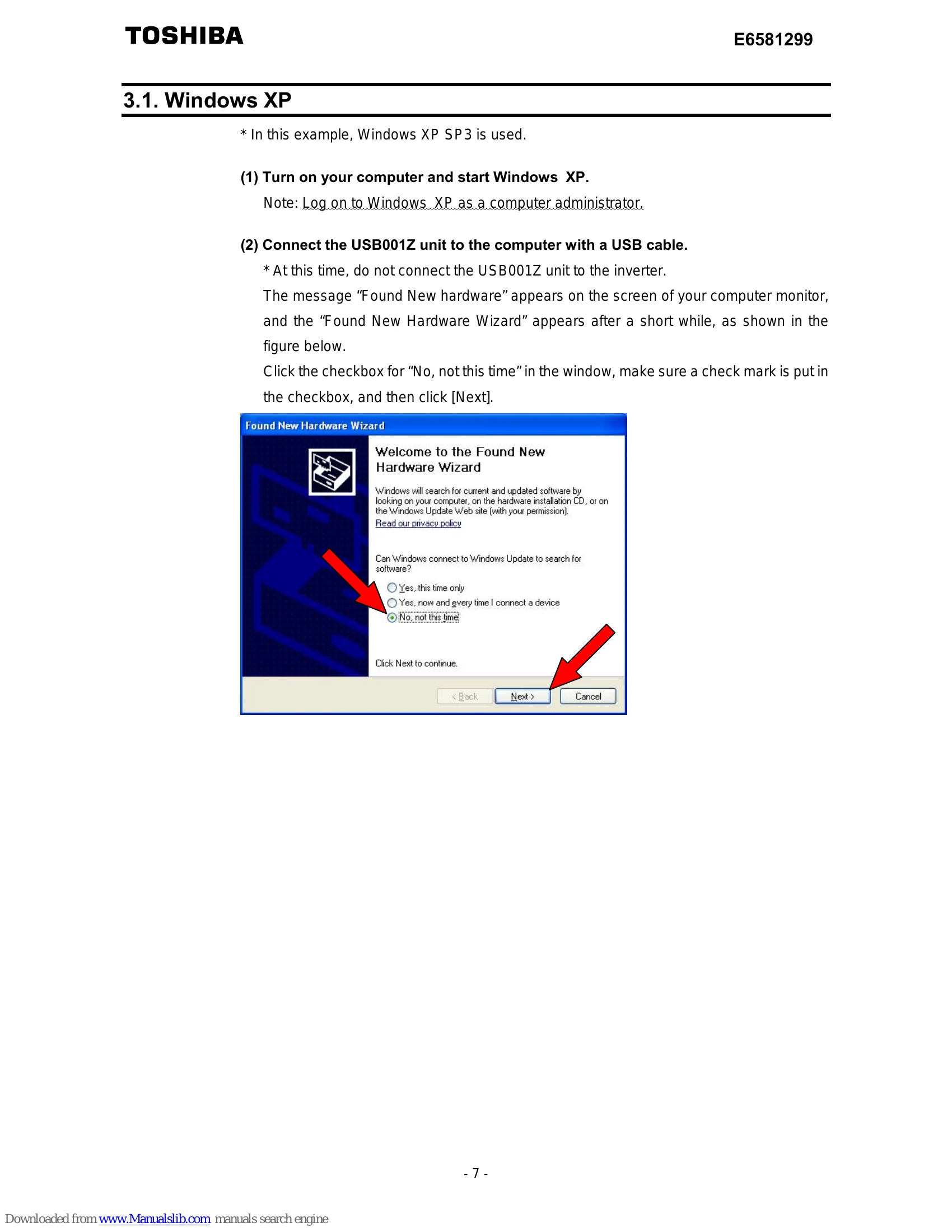
  2. Follow on-screen instructions for your operating system (Windows XP, Vista, or 7).
    • For Windows XP, select "Install the software automatically" or "Install from a list or specific location".
    • For Windows Vista/7, select "Locate and install driver software (recommended)" or "Browse my computer for driver software (advanced)".
  3. Connect the USB001Z unit to the computer with a USB cable after driver installation.
Checking the COM Port Number:
  1. Open "Device Manager" via "System Properties" (Windows XP) or "System" (Windows Vista/7).
  2. Expand "Port (COM&LPT)". The "USB/Serial Port" will show its COM number.
Connecting and Starting the Unit:
  1. Turn off inverter power and wait 15 minutes.
  2. Connect the USB001Z to your computer via USB.
  3. Connect the inverter-unit cable to the appropriate port (RS485 or LOGIC) on both the USB001Z and the inverter.
  4. Turn on inverter power and set communication parameters.
Privacy Policy