Brand: TOSHIBA
Category: Telephone
Document Type: Manual
Language: EN
Brand: TOSHIBA
Category: Telephone
Document Type: Manual
Language: EN
Uploaded: Nov. 21, 2025, 7:06 p.m.
One year limited warranty on labor and parts against defects in materials or workmanship.
Making a Call: Pick up the handset, press TALK, listen for dial tone, then dial the number. Alternatively, pick up the handset, dial the number, then press TALK.
Receiving a Call: Pick up the handset (AutoTalk) or press TALK.
Redial: Pick up handset, press TALK, listen for dial tone, then press REDIAL.
Call Waiting: Press FLASH when you hear a call-waiting tone to switch to the second caller. Press FLASH again to return to the first caller.
Volume Control: Press VOL/RING (up/down arrows) to adjust earpiece or ringer volume.
Paging Handset: Press PAGE to locate the handset. Press PAGE or any key to stop paging.
| PROBLEM | SOLUTION |
|---|---|
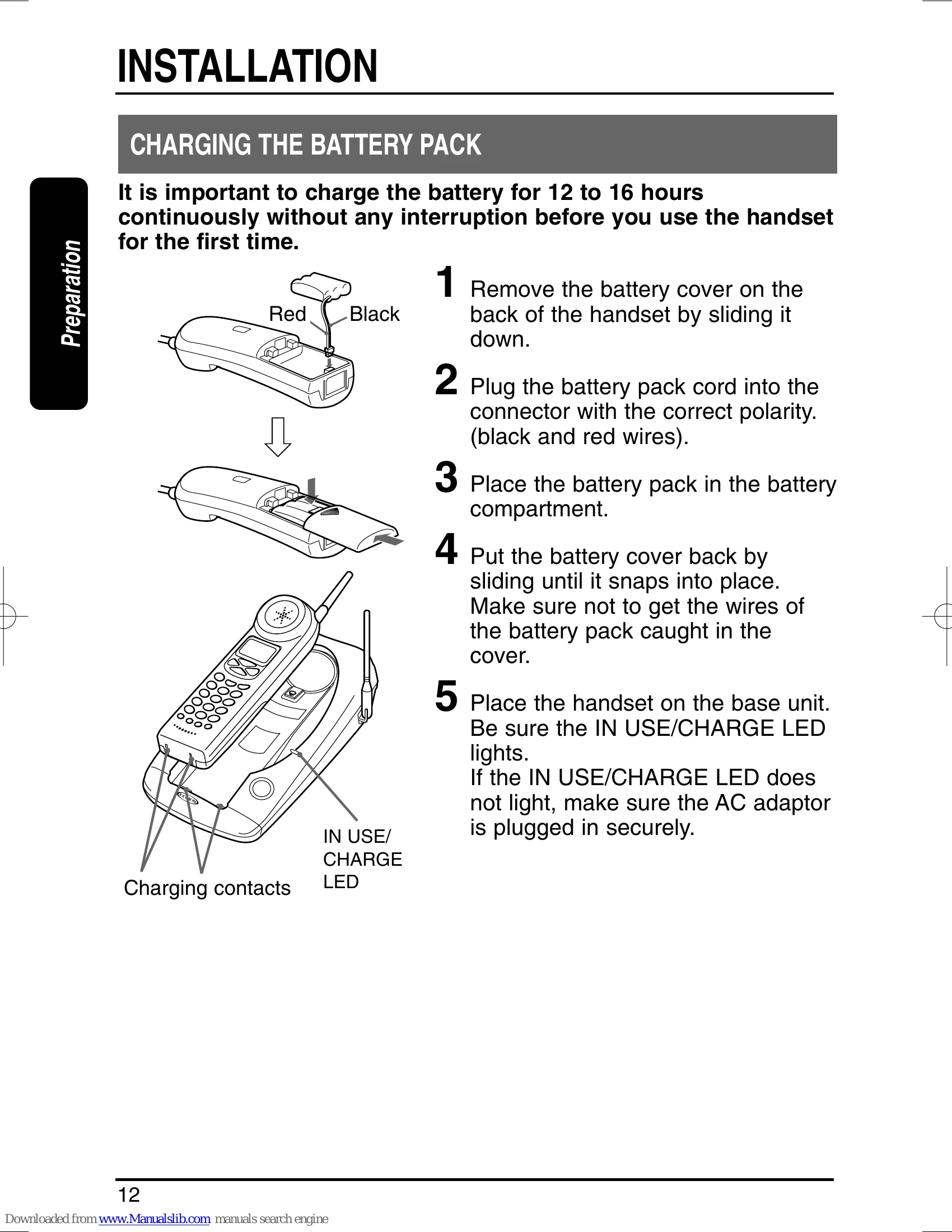
| The handset battery pack does not charge. | • The charging contacts of the handset and base are not clean. → Clean them with a dry cloth. • The battery is not connected with correct polarity. → Install the battery pack correctly. • The battery is several years old. → Replace with a new battery. |
| Battery pack becomes low quickly. | • The battery was not fully charged at the initial charging. → Charge the battery for 12 to 16 hours without any interruption. • The battery is several years old → Replace with a new battery |
| Can not make or receive calls. | • The AC adaptor of the base unit is disconnected. → Plug the AC adaptor into the base unit and the AC 120V outlet. |
| Can not hear dialtone. | • The battery is low. → Place the handset on the base unit to recharge. • Telephone line cord is disconnected. → Check both ends of the telephone jack. • The previous call was not disconnected. → Press TALK to disconnect the line. • Trouble with the telephone line. → Check an extension line. |
| Low battery blinks on the display. | • Outlet used is controlled by a wall switch in its OFF position. → Relocate it to another outlet. • The handset is too far from the base unit. → Bring the handset near the base unit. • Dial setting needs to be changed. → Press and hold FLASH key then choose the appropriate setting. |
| The handset does not ring or receive a page. | • The battery is low. → Return the handset to the base. • The handset is located away from the base or the battery has been discharged. → Return the handset to charge when finished with your call. • The digital security code is changed. → Remove the handset from the base unit and press and hold PAGE. While the handset is emitting, return the handset to the base unit. |
| CHARGE LED will not light when the handset is placed on the base. | • The battery is low. → Place the handset on the base unit to recharge. • The charging contacts of the handset and the base are not clean. → Clean them with a dry cloth. • The AC adaptor of the base unit is disconnected. → Plug the AC adaptor firmly into the base unit and AC 120V outlet. • The handset is not on the base. → Place the handset on the base properly. |
| Noise or interference. | • The handset is too far from the base unit. → Bring the handset near the base unit. • The battery is low. → Place the handset on the base unit to recharge. Interference. → Relocate to another outlet. • Interference from TV, Microwave oven, computer and electrical appliances. → Press CH to select a clearer channel, or relocate the base unit. • Excessive line noise. → Check with another telephone. |
| The unit does not operate properly. | • The phone needs to be reset. → Disconnect the AC adaptor and reconnect it after a few seconds. |
| When the handset is returned to the base unit with the volume level set at High, a momentary squeal or howling sound may sometimes be heard. | • This is normal. → It may be prevented by changing the volume setting to Medium or Low before returning the handset to the base unit. |
| The phone does not display the Caller ID/Call Waiting data. | • You have to subscribe to Caller ID/Caller ID on Call Waiting services. → Check with your local telephone company. • You answered the call before Caller ID data was received. → Let the phone ring twice before you answer the call. • The call is via PBX. → See page 26 • The battery is not fully charged. → Charge the battery. |
| Auto talk and Any-key feature do not work. | • Auto talk feature has been set to OFF. → Set this feature to ON. (Any-key feature automatically set to ON) |