Brand: TOSHIBA
Category: Telephone
Document Type: Manual
Language: EN
Brand: TOSHIBA
Category: Telephone
Document Type: Manual
Language: EN
Uploaded: Nov. 21, 2025, 7:02 p.m.
This product has a one (1) year limited warranty on parts and labor.
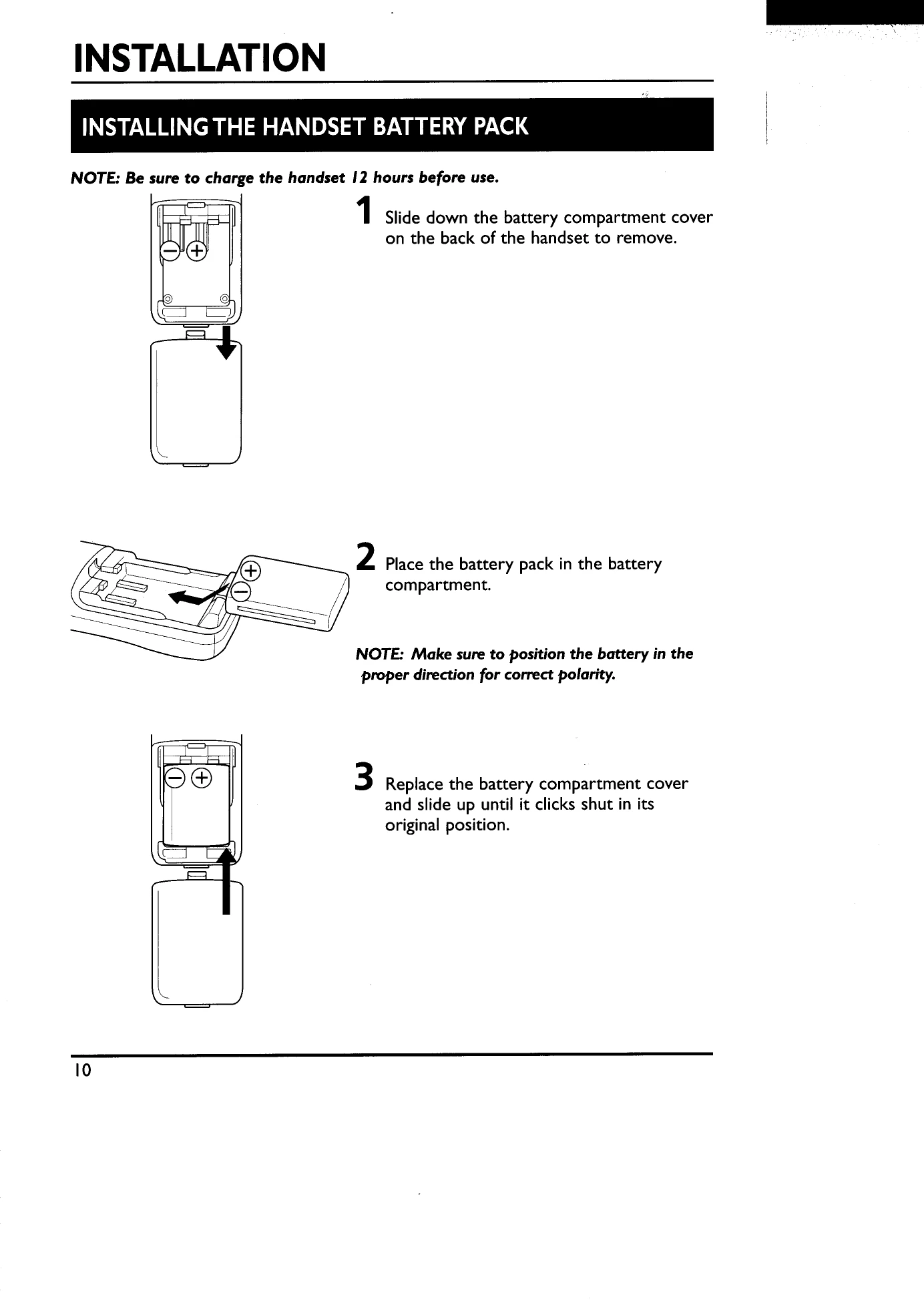
After unpacking, charge the battery pack for 12 hours. Plug in the AC adaptor, place the handset in the cradle, and ensure the "Charge" LED lights up. Once charging is complete, connect the base unit to the telephone line. Set the Tone/Pulse switch to match your service type.
Press the TALK button (or SPEAKER), then the LINE 1 or LINE 2 button. Dial the number.
Press the TALK button (or SPEAKER) or the LINE 1 or LINE 2 button when the phone rings.
One-Touch Dial: Press MEM, key in the number, press MEM again, then press the one-touch dialing key (1 to 8).
Two-Touch Dial: Press MEM, key in the number, press MEM again, then press the memory dial number (0 to 9).
| Problem | Cause and Remedy |
|---|---|
| No dial tone. Cannot receive incoming calls. |
• AC adaptor of the base unit is not plugged into an AC 120V power outlet. • Battery power is insufficient. → Place the handset in its cradle on the base unit to recharge. • Telephone line cord is not properly connected. → Check the wall telephone jack. • The previous call is not disconnected. → Press the TALK button to disconnect the line. • Trouble with the telephone line. → Confirm using another telephone. • There is no power from the AC 120V power outlet. → Relocate to different outlet. |
| The line is noisy. |
• The handset is too far from the base unit. → Bring the handset closer to the base unit. • The battery power is insufficient. → Place the handset in its cradle on the base unit to recharge. • The base unit is located in a place with high electrical interference. → Relocate the base unit. • Interference from TV, appliances, etc. → Move away from the source of interference. • There may be line noise. → Confirm using another telephone. |
| The battery does not retain its charge. There is no power to the handset. |
• To avoid Ni-Cd battery power residual effect which could shorten the life of the battery, be sure to charge according to the instructions on the inside front cover. • Battery needs to be replaced. |
| The unit malfunctions and does not operate normally. |
Try this procedure: 1 Disconnect the AC adaptor. 2 After a few seconds, connect the AC adaptor again. |
| The TALK/BATT LOW LED blinks every 3 seconds and all handset buttons are disabled during the standby status. |
Battery power is low. → Place the handset in its cradle on the base unit to recharge. → Replace the battery of the handset with the battery of the base unit. |
| During a phone conversation on the handset, a short beep sounds every 3 seconds and the TALK/BATT LOW LED also blinks every 3 seconds. All handset buttons except the TALK button are disabled (pressing the TALK disables all other buttons). |
Battery power is low. → Place the handset in its cradle on the base unit to recharge. → Replace the battery of the handset with the battery of the base unit. |