Brand: TOSHIBA
Category: Television
Document Type: Manual
Language: EN
Brand: TOSHIBA
Category: Television
Document Type: Manual
Language: EN
Uploaded: Nov. 21, 2025, 6:12 p.m.
Offers a 1-year warranty on parts/labor and a 2-year warranty on the picture tube.
Operate your TV using front panel buttons or the remote control. The front and back panels provide inputs for connecting equipment.
Connect devices like VCRs, DVD players, satellite receivers, and audio amplifiers using coaxial, S-video, component video, or standard A/V cables.
The remote control can operate the TV, VCR, DVD player, and cable TV converters. Install batteries and program the remote for non-Toshiba devices using provided codes.
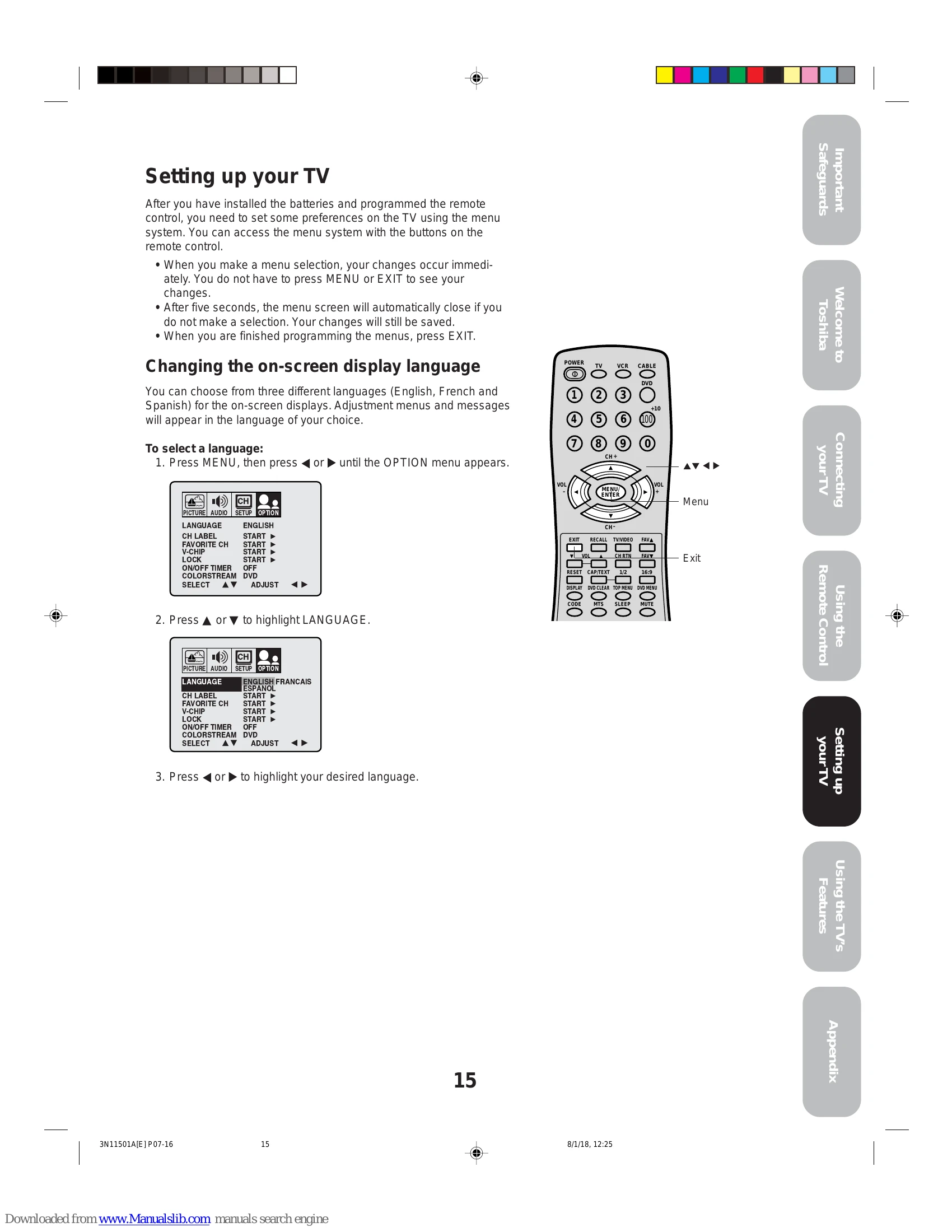
Configure on-screen display language, add channels to memory automatically or manually, and change channels using the remote or front panel buttons.
Adjust channel settings, program favorite channels, use V-Chip for parental controls, set PIN codes, lock channels, label channels, set the clock, and program ON/OFF timers. Fine-tune picture quality (contrast, brightness, color, tint, sharpness) and sound settings (bass, treble, balance, BBE, surround, StableSound). Manage closed captions, picture size, sleep timer, and auto power off features.
| Problem | Solution |
|---|---|
| TV will not turn on | • Make sure the power cord is plugged in, then press POWER. • The remote control batteries may be dead. Replace the batteries. |
| No picture, no sound | • Check the antenna/cable connections. • This TV will not accept or display 480p or 720p progressive scan signals or 1080i interlaced high-definition signals through its ColorStream inputs. Switch the other device's output to 480i interlaced mode first (see page 9). |
| No sound, picture OK | • The sound may be muted. Press VOLUME. • The station may have broadcast difficulties. Try another channel. |
| Poor sound, picture OK | The MTS feature may be in SAP mode. Press the MTS button on the remote control until STEREO (or MONO) mode is active. |
| Poor picture, sound OK | • The station may have broadcast difficulties. Try another channel. The MTS feature may be in SAP mode. Press the MTS button on the remote control until STEREO (or MONO) mode is active. |
| Poor reception of broadcast channels | • Check the antenna connections. • The station may have broadcast difficulties. Try another channel. • Adjust the PICTURE menu. • This TV will not accept or display 480p or 720p progressive scan signals or 1080i interlaced high-definition signals through its ColorStream inputs. Switch the other device's output to 480i interlaced mode first (see page 9). |
| Cannot receive above channel 13 | • The station may have broadcast difficulties. Try another channel. |
| Unable to select a certain channel | • Check the antenna connections. • If you are using a VCR, make sure the TV/VCR button is set correctly. • Make sure TV/CABLE is set to CABLE mode. |
| Cannot access signal input sources (Video1, Video2, Video3 and ColorStream) and/or Channels 3 and 4 | • The channel may be blocked by the V-Chip feature or CH LOCK feature, or erased with the add/erase feature. Check the VIDEO LOCK feature. |
| Multiple images | • The station may have broadcast difficulties. Try another channel. • Use a highly directional outdoor antenna. |
| Poor color or no color | • The station may have broadcast difficulties. Try another channel. • Adjust the TINT and/or COLOR in the PICTURE menu. • If you change the direction of the TV while it is turned on, the picture could suffer from color shading. If so, turn off the TV and allow it to cool for several hours before turning it on again. |
| Black box on screen | • Repeatedly press CAP/TEXT to turn off the Closed Caption Text mode. |
| No stereo or SAP sound from a known MTS broadcast | • Make sure the MTS feature is set properly. |
| The V-Chip PIN code does not work (U.S. V-Chip system only) | • Change or reset your PIN code (pages 18 and 19). |
| The remote control does not operate | • Make sure the TV/VCR/DVD/CABLE mode is set properly. • Remove all obstructions between the remote control and the TV. The remote control batteries may be dead. Replace the batteries. |