Brand: TOSHIBA
Category: Television
Document Type: Manual
Language: EN
Brand: TOSHIBA
Category: Television
Document Type: Manual
Language: EN
Uploaded: Nov. 21, 2025, 6:15 p.m.
Toshiba is not liable for damages caused by fire, natural disasters, misuse, or failure to follow instructions.
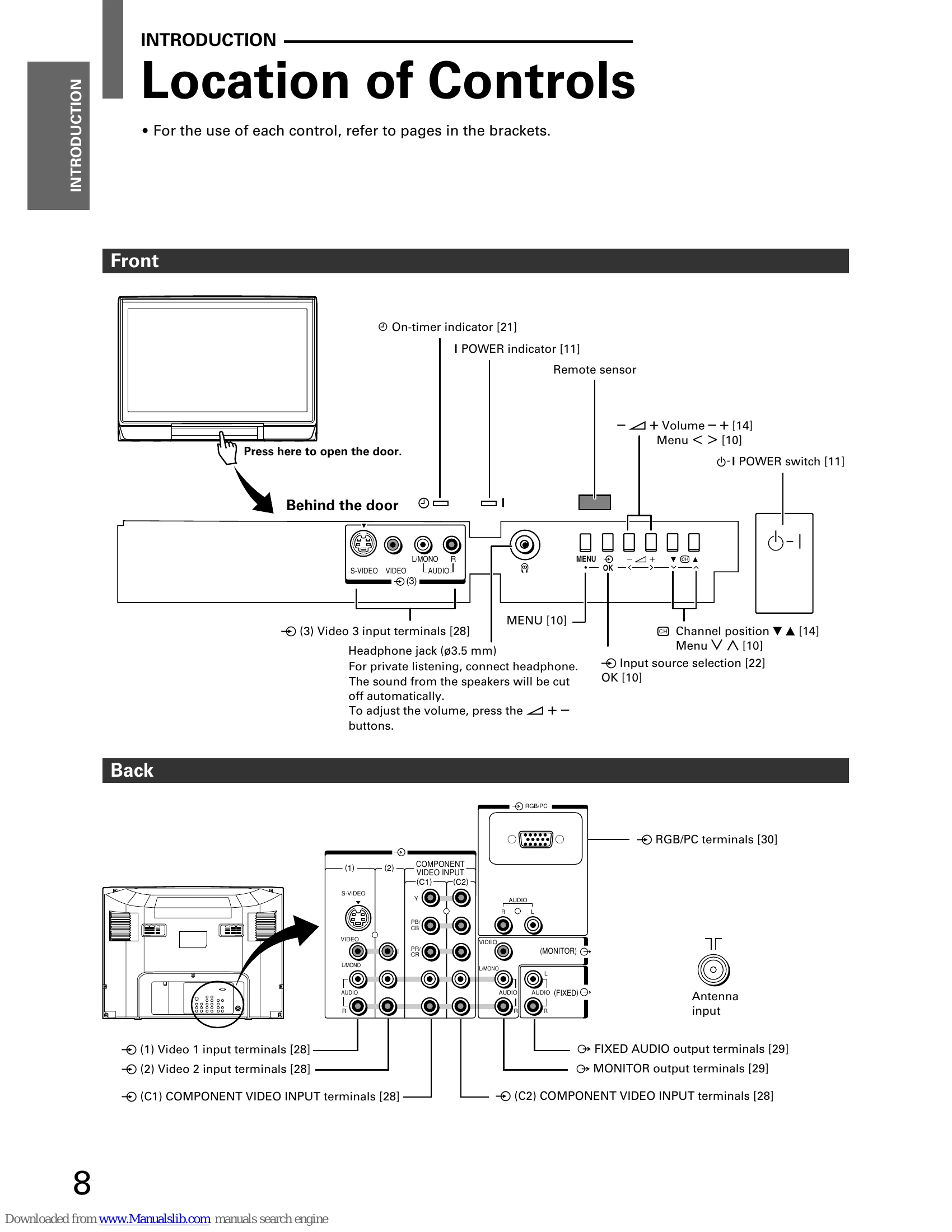
Turning the TV On/Off: Press the front panel power switch or the remote's power button. Press the power button again to standby. Press the front panel switch to turn off completely.
Changing Display Language: Press MENU, then navigate to SET UP to select language from English, Chinese, Malay, Thai, Vietnamese, Russian, and Arabic.
Channel Memory: Use Auto tuning to preset channels or Manual tuning to arrange them. Program sorting allows reordering channels.
Watching Programs: Use number buttons or CH ▲▼ for selection. Adjust volume with +/- buttons. Mute with the mute button.
Picture and Sound Controls: Select preset picture and sound modes or adjust them manually. Features include Digital Noise Reduction, Super Woofer, SRS WOW surround sound, and MTS selection.
Wide-Screen Formats: Choose from Super live, Cinema, Subtitle, 14:9, Wide, and 4:3.
Other Features: Picture tilt correction, Off/On timers, input source selection, PC settings, and Teletext are available.
| Symptom | Check these things |
| Power is not turned on. | • Be sure the power cord is plugged in. • The headphones may be plugged in. |
| No sound | • The headphones may be plugged in. |
| Poor color/tint | • The contrast, color and tint may need to be adjusted. • If you change the direction of the TV while the TV is on, the picture may suffer from color shading. If so, turn off the TV and allow about 30 minutes to cool, then turn on the TV again. The picture should improve. |
| Spots appear on the screen. | • The broadcast signal may be jammed by other electrical sources such as cars, motorcycles, electric trains, high tension lines, neon signs, hair dryers. • The broadcast signal may be jammed by other TV receivers, personal computers, and TV games, as well as interference from radio stations. |
| Lines appear on the screen. | • Interference may be due to broadcast waves reflected from mountains or buildings. |
| Double or triple images | • Check if the direction of the antenna has changed due to strong wind. |
| Snowy picture | • The antenna lead may be broken or disconnected. • Check if the direction of the antenna has changed. |
| Remote control does not work. | • The batteries in the remote control may be exhausted. • The batteries may be improperly installed. • Check that there is no obstruction between the remote control and the remote (infrared) sensor. • Check that a strong light is shining on the remote (infrared) sensor. • Check that the main power is not turned off. |
The following are not malfunctions
| Symptom | Explanation |
| The cabinet clicks. | • The clicking is a creaking sound produced when the cabinet expands or contracts due to changes in the temperature. This will not affect the picture or sound. |
| Unevenness in color sometimes develops in part of the screen. | • If the brightness is set too high, such unevenness in color may occur depending upon the nature of the picture. The proper color can be restored by reducing the contrast. Consult your local dealer. |