Brand: VCC
Category: Security Cameras
Document Type: Manual
Language: EN
Brand: VCC
Category: Security Cameras
Document Type: Manual
Language: EN
Uploaded: Nov. 21, 2025, 6:28 p.m.
Support of Network Operation: Connects via LAN cable for network monitoring. Supports PoE for installation without nearby power outlets.
High-Resolution and High-Quality Images: Features a 4-megapixel CMOS sensor for ultra-high resolution and full HD H.264 video. Supports H.264 and JPEG compression.
A Variety of Functions in One Compact Body: Includes focus assist function for precise focus adjustment and a motion sensor for integration with alarm devices.
Highly Scalable Design: Extends surveillance capabilities with associated PC software applications.
Camera: 1/3" CMOS sensor, 4-megapixel resolution, CS mount lens, various auto-iris functions, Day/Night switching, multi-spot evaluative metering, electronic shutter and iris, AGC gain, gamma correction, DNR, mirror, privacy mask, motion sensor.
I/O: Composite output, 10BASE-T/100BASE-TX LAN, 2 alarm inputs/Day/Night switching, 2 alarm outputs.
Network: H.264/JPEG compression, multiple video sizes, various picture quality modes, 10BASE-T/100BASE-TX interface, TCP/IP protocol, 20 simultaneous access, basic authentication/SSL/IP filtering security.
Others: Operating temperature -10 to +50°C, power source 12-15 VDC/24 VAC/PoE, 4.6W consumption, 220g weight.
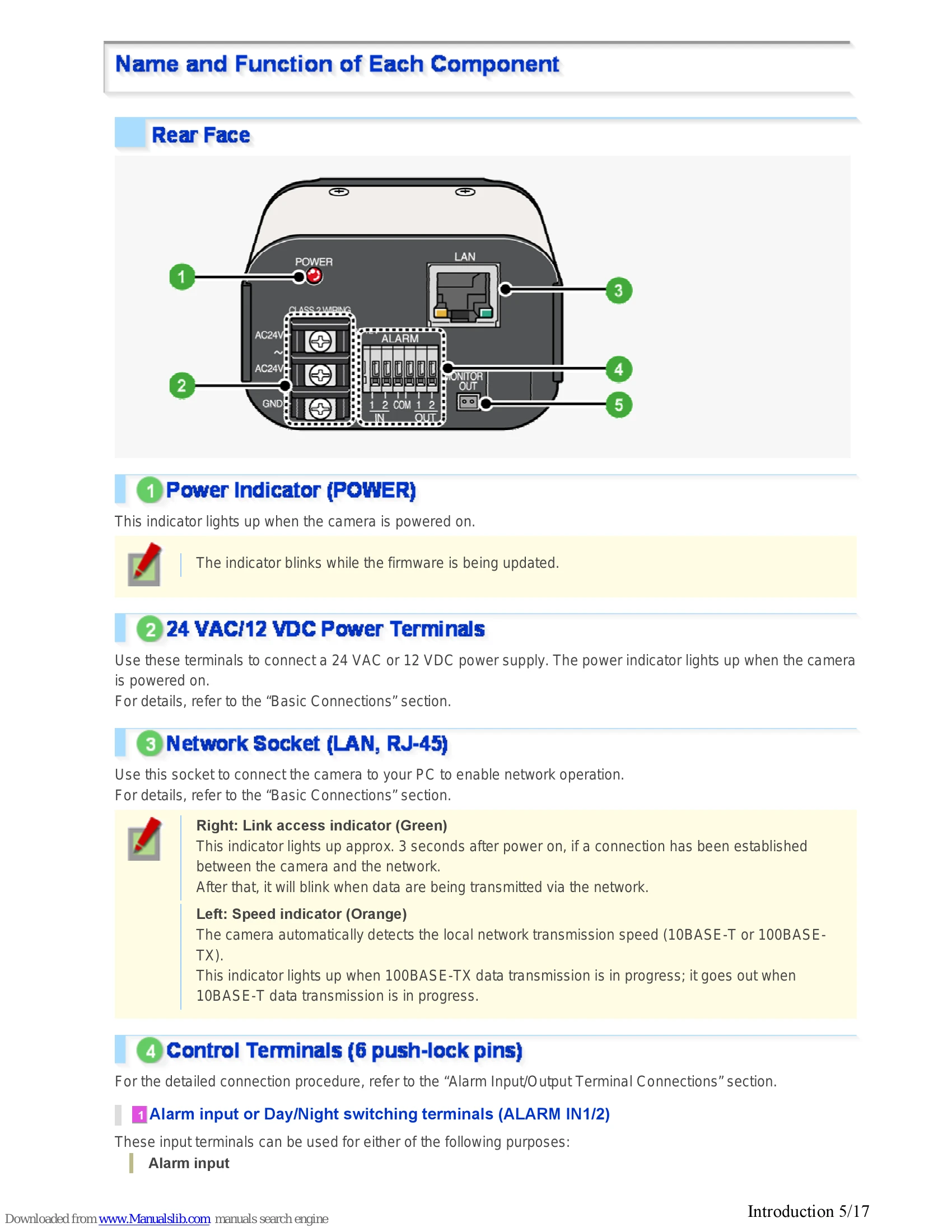
Rear Face: Power indicator, 24 VAC/12 VDC power terminals, LAN socket (RJ-45) with link/speed indicators, control terminals (push-lock pins) for alarm input/output and COM, monitor output socket.
Side Face: Auto Iris Lens Socket, Operation Buttons (RESET, NEAR, FAR, SET).
Basic Connections: Power connection (24 VAC or 12 VDC), Network connection (LAN to PC), PoE support for network power.
Alarm Input/Output Terminal Connections: Diagrams and instructions for connecting external alarm devices, switches, and for clock adjustment.
Instructions for connecting an optional auto iris lens to the auto iris lens socket.
Focus Adjustment (FOCUS ASSIST): Using the monitor and buttons to achieve accurate focus.
Flange Back Adjustment: Adjusting the flange back distance for optical zoom lenses.
Iris Adjustment (IRIS): Adjusting the lens iris for proper brightness.
Instructions to check the firmware version, IP address, and MAC address via the camera's interface or network operation.