Brand: Vivitar
Category: Digital Camera
Document Type: Manual
Language: EN
Brand: Vivitar
Category: Digital Camera
Document Type: Manual
Language: EN
Uploaded: Aug. 10, 2025, 12:53 a.m.
This warranty covers defects in material or workmanship for one year from the purchase date.
Powering On/Off: Press the Power button on the side to turn the camera on or off. Auto power-off activates after 60 seconds of inactivity.
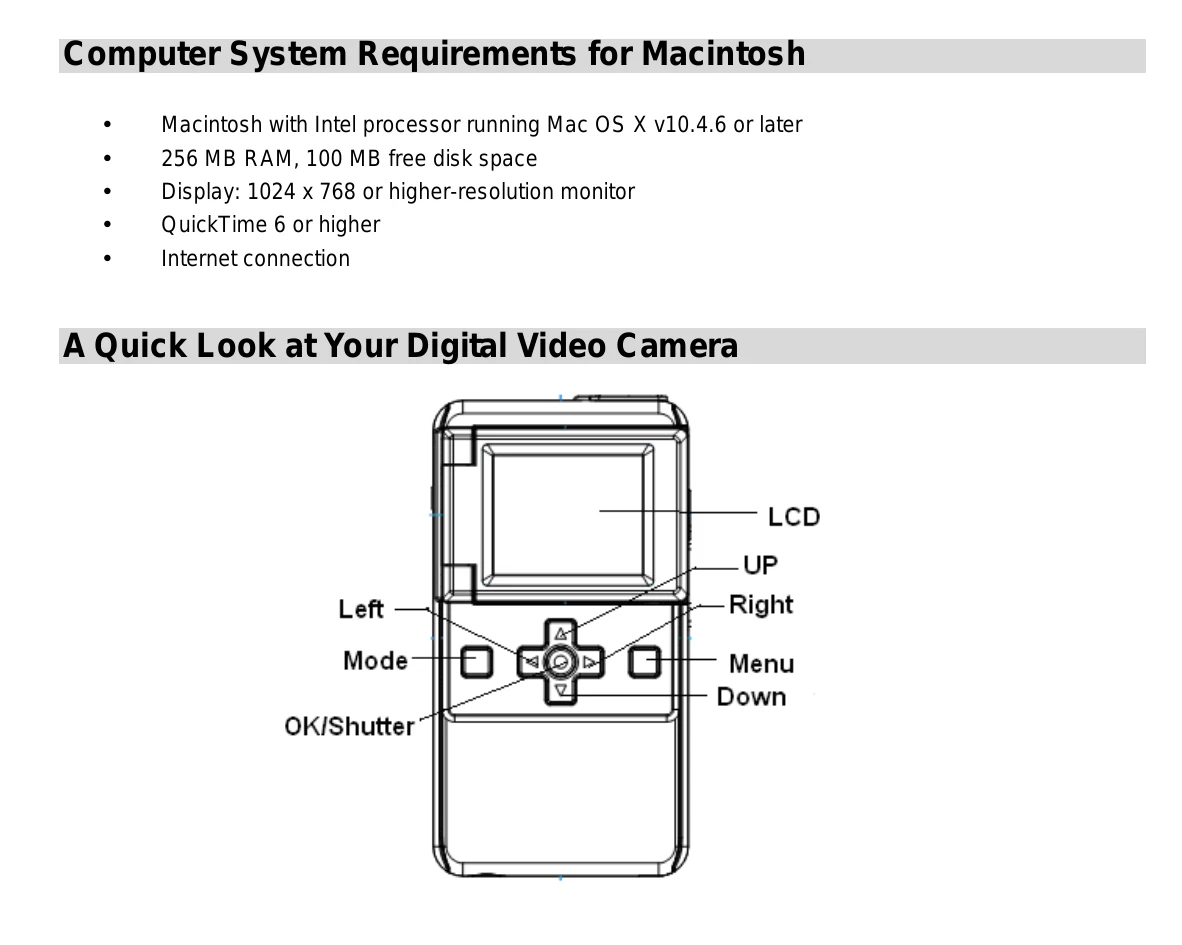
Changing Modes: Press the Mode button to switch between Video, Camera, and Playback modes. The selected mode icon appears on the LCD.
Shooting Videos: Select Video mode. Compose your shot, then press OK/Shutter to start recording. Press again to stop and save. Use the Menu button to adjust resolution, frequency, speaker, and language settings.
Taking Photos: Select Camera mode. Compose your shot, use Left/Right buttons for zoom. Press OK/Shutter to capture. Use the Menu button for capture settings (SINGLE, CONT, SELF), resolution, frequency, speaker, and language.
Playback: Select Playback mode to view photos and videos. Use Up/Down to navigate, Right to zoom in, Left to zoom out. Press OK/Shutter to play videos. Use Menu to delete files or format the memory card.
TV Out: Connect the camera to an NTSC-compatible TV using the supplied cable to view content on a larger screen.
| The Camera does not Power on. |
1. Batteries inserted in wrong direction. ☆Reload batteries in correct direction. 2. Batteries have insufficient power. ☆Replace batteries. |
| The camera does not take pictures. |
1. Memory is full. ☆Download images and delete from SD card or insert a new memory card. 2. Memory card not formatted correctly. ☆Format the memory card again or use a new card. |
| Image is blurry or out of focus. | 1. Camera was moving during capture. ☆Hold camera steady when shooting. |
| Images were deleted by mistake. Can I retrieve them? | 1. Images were deleted and removed from the computer. ☆All deleted images can be found and retrieved from the Recycle or Trash Bin. |
| Recorded images are not saved in memory. | 1. Camera turned off before saving. ☆If battery low indicator appears, replace batteries immediately. |