Manual for BESSA III 667 W

Manual for BESSA III 667 W

Brand: Voigtländer

Category: Camera

Document Type:

Language: EN
Uploaded: Aug. 9, 2025, 11:37 p.m.

Warranty Information

None

  • For Your Safety: Read safety notes carefully. Do not use for non-photography purposes. Store notes safely.
  • Warning: Indicates potential death or serious injury if ignored.
  • Caution: Indicates potential personal injury or material damage if ignored.
  • Warnings: Do not disassemble, alter, or take apart. Remove battery if camera overheats or emits smoke/odor. Remove battery if water or foreign matter enters the camera. Keep out of reach of children to prevent strangulation.
  • Battery Warnings: Do not disassemble, heat, throw into fire, charge, or fry. Use only specified batteries. Keep out of reach of children who may swallow them.
  • Battery Caution: Do not insert battery incorrectly to avoid bursting or leakage.
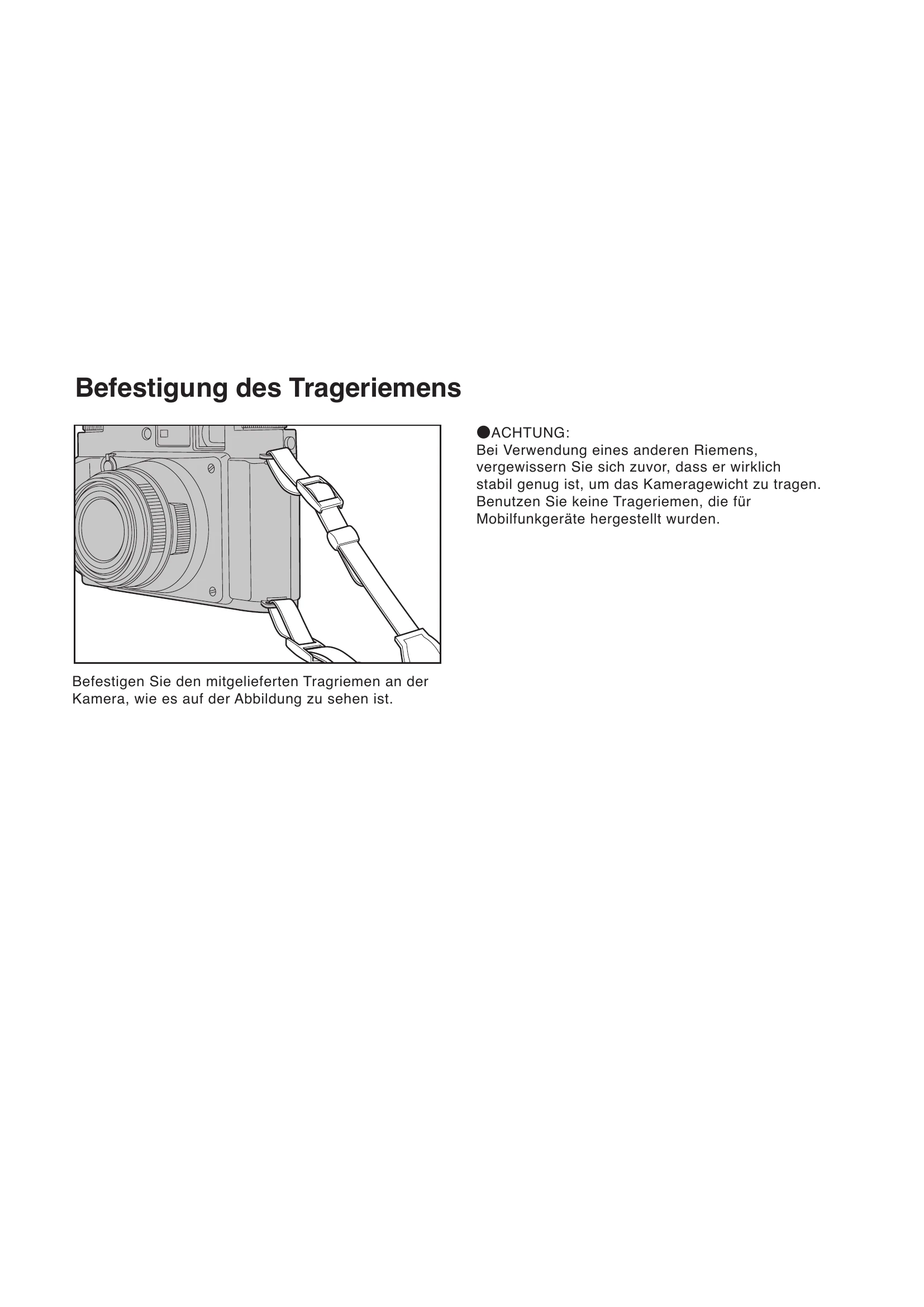
  • Attaching Strap: Attach provided strap securely. Do not use straps for mobile phones.
  • Eyepiece Attachment: Screw on eyepiece protection glass or optional correction lens.
  • Inserting Battery: Use CR2 lithium battery. Open compartment by turning counter-clockwise. Insert with positive pole (+) down. Close compartment by turning clockwise.
  • Battery Test: Press shutter release halfway to check battery status (full, weak, or empty).
  • Turning Camera On/Off: Turn power switch counter-clockwise to turn on. Turn clockwise to turn off and lock shutter button.
  • Attaching/Removing Lens Hood: Loosen screw, screw hood onto lens, tighten screw.
  • Filters: Use filters with 58mm diameter. Multiple filters may cause vignetting.
  • Loading Film: Use 120 or 220 film. Open back cover by sliding lock forward and then up. Close back cover until it clicks.
  • Film Type Setting: Adjust film pressure plate to 120 or 220. Check film type in the window on the back.
  • Setting Start Mark: Align film start mark with camera start mark. Push film gently and advance to spool.
  • Film Advance: Turn film advance dial counter-clockwise until it stops.
  • Focusing: Look through viewfinder, center subject. Turn focusing ring until double image converges.
  • Shutter Release: Press shutter release button when frame counter shows '1' or more. Hold camera steady for sharp photos. Use tripod and cable release for speeds slower than 1/30 sec.
  • Exposure Settings:
    • Aperture Priority AE: Set shutter speed dial to 'A', camera selects shutter speed. Turn aperture ring to desired F stop.
    • Manual Exposure: Align F stop to index. Align shutter speed indicator to index mark.
    • Exposure Compensation: In Aperture Priority mode, adjust compensation dial +/-2 in 1/3 steps.
    • Bulb (B) Setting: Set shutter speed dial to 'B'. Shutter remains open while button is pressed.
  • Flash Photography: All shutter speeds synchronize with flash. Clip-on flashes go in hot shoe. Other flashes connect via synchronizing cord.
  • Connecting Cable Release: Screw cable release tip into threaded hole on shutter release button.
  • Depth of Field Indicator: Use depth of field scale on lens for more details.
  • Specifications: Details on film format, frames, lens, aperture, viewfinder, etc.

Troubleshooting and error codes

Condition Cause Solution
When all shutter speed indicators light up, or none light up. Battery may be low on energy. Replace battery.
When the "500" indicator blinks rapidly. Overexposure. Adjust aperture to reduce light.
When the "4s" indicator blinks rapidly. Underexposure. Adjust aperture to increase light.
Privacy Policy