Brand: Voigtländer
Category: Camera
Document Type:
Language: EN
Brand: Voigtländer
Category: Camera
Document Type:
Language: EN
Uploaded: Aug. 9, 2025, 11:37 p.m.
Congratulations on your selection of Bessa camera.
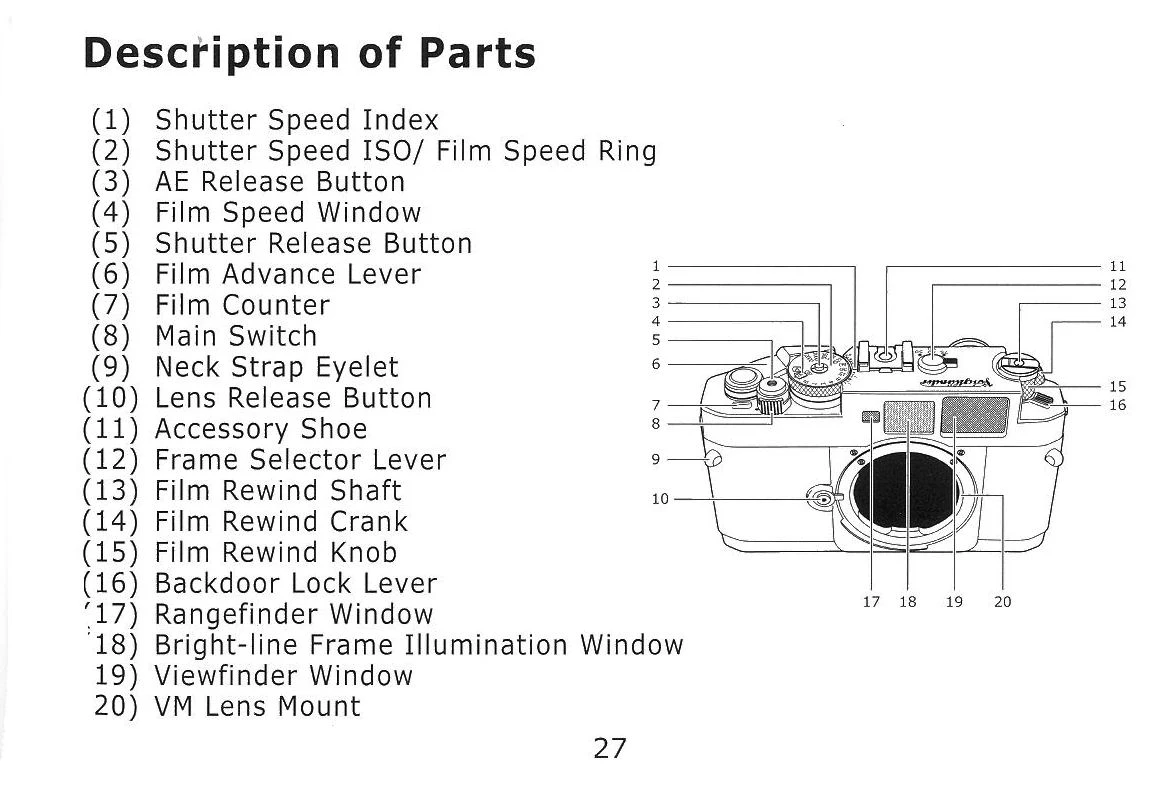
This is a compact and lightweight rangefinder camera with VM lens mount.
Focusing: Turn the focusing ring until the doubled images seen at the finder's center converge to a single image.
Exposure Metering: The camera is equipped with Auto and Manual exposure metering systems, aided by LED indicators in the viewfinder.
Loading Film: Open the back door, insert the film cartridge, and advance the film until the counter shows "1".
Setting Film Speed: Lift the Film Speed Set Ring and turn until the arrow indicator points to the desired Film speed (ASA/ISO).
Aperture Priority Mode: The camera automatically selects shutter speed based on aperture and subject brightness.
Manual Exposure: Set shutter speed and aperture manually, using the viewfinder LEDs for exposure guidance.
Rewinding Film: Press the rewind button, unfold the crank, and turn until the film is rewound.
| Problem | Possible Cause | Solution |
|---|---|---|
| No LED in viewfinder | Main switch is OFF or film is not advanced | Turn Main Switch to ON. Advance the film. |
| LEDs blink "2000" quickly | Overexposure | Turn aperture ring to higher setting. |
| Turn shutter speed ring to higher setting. | ||
| LED "1" blinks slowly | Exposure time is 1 sec. to 8 secs. | Turn aperture ring to lower setting. |
| Turn shutter speed ring to lower setting. | ||
| LED "1" blinks fast | Underexposure | Turn aperture ring to higher setting. |
| Turn shutter speed ring to higher setting. |