Manual for 9907 4K

Manual for 9907 4K

Brand: WASPcam

Category: Action Camera

Document Type: Manual

Language: EN
Uploaded: Aug. 10, 2025, 12:39 a.m.

Manual Publish Date: 2016-06-01

Warranty Information

Cobra Electronics is not responsible for any damage or personal injuries resulting from use.

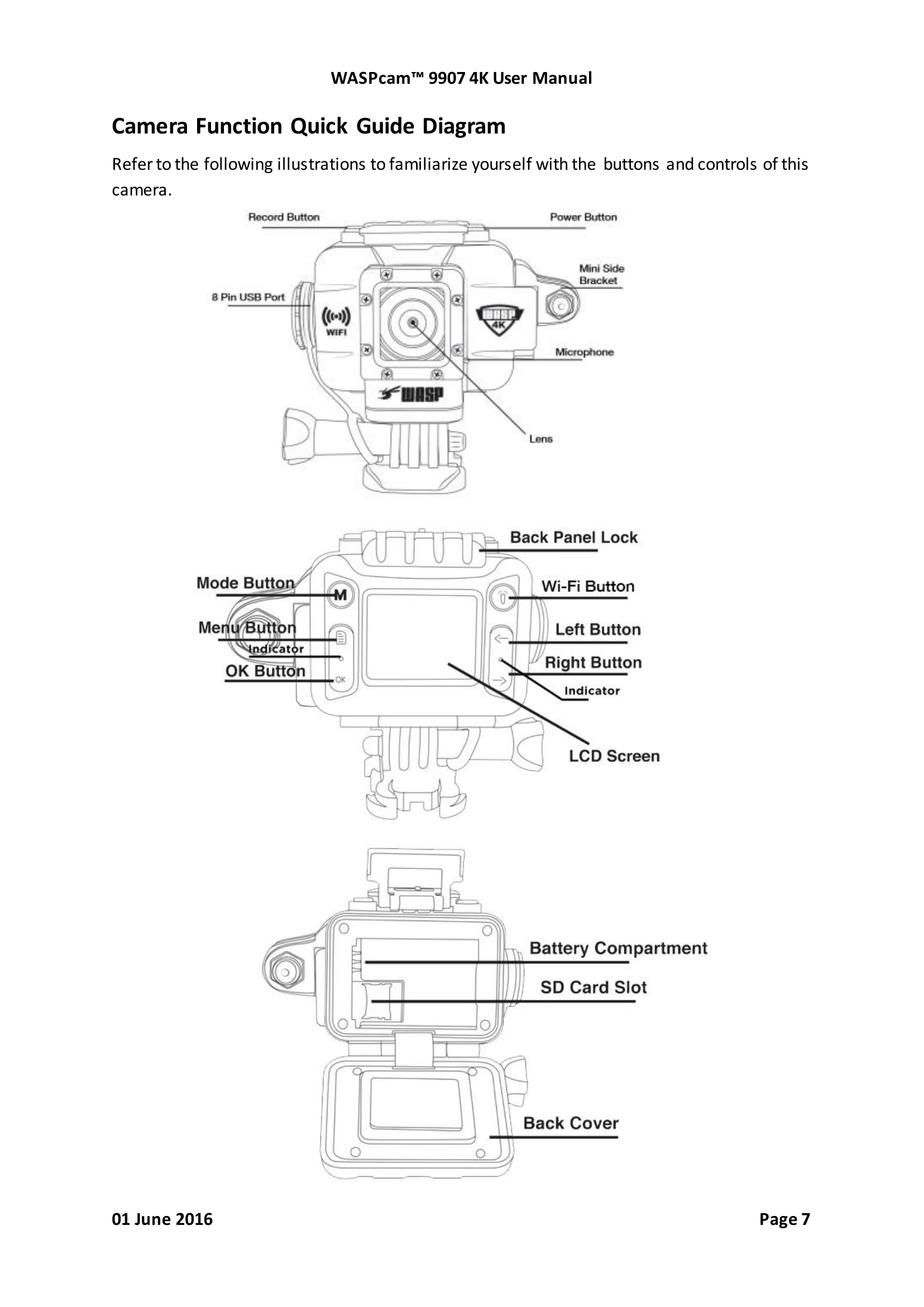
  • Turning On/Off: Press and hold the Power Button for 3 seconds.
  • Switching Modes: Use the Mode Button to cycle through picture, video, and playback modes.
  • Recording Video: In video mode, press the Record Button to start/stop recording.
  • Taking Photos: In photo mode, press the Record Button to take a photo.
  • Navigating Menus: Use the Menu Button to enter settings, Left/Right buttons to navigate, and OK Button to confirm.
  • Using Wi-Fi: Press the Wi-Fi Button to turn Wi-Fi on/off. Connect to 'WASPcam' network with password '12345678' via smartphone app.
  • Charging: Connect using the USB cable. The red indicator light turns off when fully charged.
  • Inserting SD Card: Open back cover, slide lock down, insert card, push lock up. Use Class 10, max 64GB.
Privacy Policy