About the User Guide
Most operation descriptions are based on default settings. Unless noted otherwise, descriptions are for Home Screen. Some operation descriptions may be omitted.
Before You Begin
Read "Safety Precautions" and this guide thoroughly beforehand for proper usage. Accessible services may be limited by contract conditions. Unauthorized copying of any part of this guide is prohibited. Guide content subject to change without prior notice.
Data Communication
Handset is designed to be always connected to the Internet. Some functionality, such as data syncing, initiate transmission automatically.
Large-volume data communication (application downloads, video viewing, etc.) incur expensive transmission fees. Subscription to a flat-rate data plan is strongly recommended.
Depending on applications and services used, transmission fees may be incurred even while connected by Wi-Fi®.
Screenshots & Key Labels
Screenshots and Key labels are provided for reference only. Actual handset windows, menus, etc. may differ in appearance.
Other Notations
Xperia 5 III is referred to as "handset" in this guide.
In this guide, microSD™/microSDHC™™/microSDXC™™ Card is referred to as "SD Card."
In this guide and on handset, "abroad" means "outside Japan" with regard to handset/service usage.
Parts & Functions
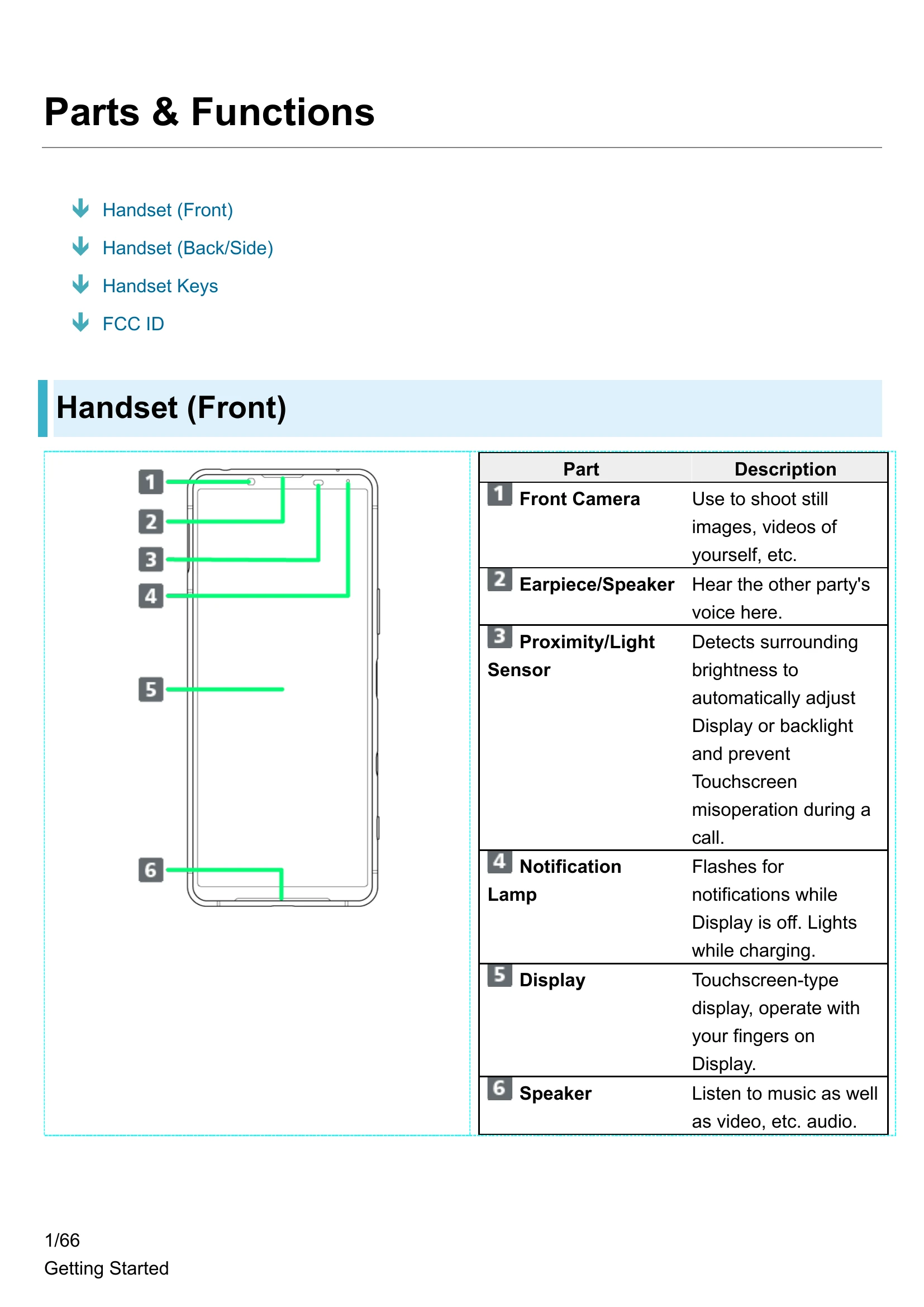
Handset (Front)
- 1 Front Camera: Use to shoot still images, videos of yourself, etc.
- 2 Earpiece/Speaker: Hear the other party's voice here.
- 3 Proximity/Light Sensor: Detects surrounding brightness to automatically adjust Display or backlight and prevent Touchscreen misoperation during a call.
- 4 Notification Lamp: Flashes for notifications while Display is off. Lights while charging.
- 5 Display: Touchscreen-type display, operate with your fingers on Display.
- 6 Speaker: Listen to music as well as video, etc. audio.
Handset (Back/Side)
- 1 Second Mic: Reduces noise for calling. Also picks up audio when capturing videos.
- 2 Headset Jack: Connect commercially available headphones. This port supports tetrapolar headset that conforms to the CTIA standard.
- 3 RGBC-IR Sensor: Recognizes surrounding light sources when shooting.
- 4 Flash/Photo Light: Use as camera flash when taking photos, etc.
- 5 Main Camera: Capture still images and videos.
- 6 5G/4G Antenna Area: Internal Antenna for calls and data communication.
- 7 5G/4G Antenna/Wi-Fi Antenna Area: Internal Antennas for calls, data communication, and Wi-Fi.
- 8 5G/4G Antenna/Wi-Fi/GPS/Bluetooth® Antenna Area: Internal Antennas for calls, data communication, and Wi-Fi, GPS, and Bluetooth features.
- 9 Wi-Fi/Bluetooth Antenna Area: Internal Antennas for Wi-Fi and Bluetooth features.
- 10 NFC/Osaifu-Keitai® Detection: Hold up to a reader/writer to use NFC/Osaifu-Keitai®.
- 11 SIM Card/SD Card Slot: Insert SIM Card/SD Card.
- 12 USB Type-C™ Port: Connect USB Type-C cable (commercially available), etc.
- 13 Mic: Speak here.
Using USB Type-C Port
Connect DisplayPort-compatible USB Type-C cable (commercially available) and show handset screen on a TV or computer monitor. Also, use a USB-LAN adapter (commercially available) and connect to the Internet with a wired LAN cable. Your USB Type-C cable, USB-LAN adapter, or access point device might not work in some instances.
Handset Keys
- 1 Volume/Zoom Up/Down Key: Adjust Volume. Adjust Zoom while using Photo Pro.
- 2 Power Key/Fingerprint Sensor: Long Press for power on/off. Turn Display on/off. Or, use Fingerprint authentication.
- 3 Google Assistant Key: Launch the Google Assistant.
- 4 Camera Key: Use as Camera shutter. Long Press to launch Photo Pro.
FCC ID
To view the regulatory compliance mark:
Find and tap Settings -> About phone -> Certificates
Regulatory compliance mark such as FCC ID is displayed on the screen.
SIM Card
SIM Card is an IC card containing phone number and other customer information.
Handling SIM Card
- ①IC chip: For SIM Card handling, see SoftBank Website. https://www.softbank.jp/mobile/support/protect/usim/ (Japanese)
- Always keep the IC chip clean.
- Wipe clean with a dry, soft cloth.
- Avoid applying labels. May damage SIM Card.
SIM Card Cautions
Observe the following when using SIM Card.
- Customer is responsible for any damage caused by inserting SIM Card in an other-brand IC card reader, etc. SoftBank Corp. is not responsible in such case.
- SIM Card is the property of SoftBank Corp.
- SIM is replaceable (at cost) in case of loss/damage.
- Return SIM Card to SoftBank Corp. when cancelling subscription.
- Returned SIM Cards are recycled for environmental purposes.
- Note that SIM Card specifications and performance may change without notice.
- It is recommended that you keep a separate copy of information that is stored on SIM Card. SoftBank Corp. is not responsible for damages from stored information that is lost.
- Always follow emergency procedures to suspend service if your SIM Card or handset (SIM Card inserted) is lost/stolen. For details, contact Customer Service.
- Always power off handset before inserting/removing SIM Card.
- Some services, functions, etc. may have restrictions when an other-carrier SIM card is used.
SoftBank Corp. does not guarantee operation whatsoever.
Inserting SIM Card
Always unmount SD Card beforehand. For details, see "Unmounting SD Card."
1
Pull Tray out from handset
- Pull SIM Card/SD Card Slot Cover out straight using fingernail in groove.
2
Set SIM Card into Tray with IC chip (metal) facing down
- Check SIM Card orientation by notch.
- Make sure SIM Card is in Tray securely.
3
Holding handset held level, press Tray in straight
- SIM Card is inserted.
- Check Tray orientation.
- Press firmly where circled 0, and make sure there is no gap between handset and SIM Card/SD Card Slot Cover.
Removing SIM Card
Always unmount SD Card beforehand. For details, see "Unmounting SD Card."
1
Pull Tray out from handset
- Pull SIM Card/SD Card Slot Cover out straight using fingernail in groove.
2
Remove SIM Card from Tray
3
Holding handset held level, press Tray in straight
- SIM Card is removed.
- Check Tray orientation.
- Press firmly where circled 0, and make sure there is no gap between handset and SIM Card/SD Card Slot Cover.
SD Card
Handset supports SD Cards up to 1 TB. Some SD Cards may not operate properly. When using a new SD Card for the first time, always format it on handset.
SD Card Cautions
- Data: Information stored on SD Card can become lost or changed accidentally or as a result of damage. It is recommended that you keep a separate copy of important data. SoftBank Corp. is not responsible for damages from data that is lost or changed.
- Reading/Writing Data: Never power off while reading or writing data.
- Battery Level: A low battery charge may prevent reading/writing to SD Card.
Handling SD Card
Use/store SD Cards away from the reach of infants. May cause choking if swallowed.
Inserting SD Card
1
Pull Tray out from handset
2
Set SD Card into Tray with metal terminals facing down
- Make sure SD Card is in Tray securely.
3
Holding handset held level, press Tray in straight
- SD Card is inserted.
- Check Tray orientation.
- Press firmly where circled o, and make sure there is no gap between handset and SIM Card/SD Card Slot Cover.
Formatting SD Card
1
In Home Screen, (Settings)
2
Storage
3
for "SD card"
4
If confirmation appears, follow onscreen instructions.
5
Storage settings
6
Format
7
FORMAT SD CARD
8
Done
All data on SD Card is erased.
Cautions when Formatting SD Card
Observe the following when formatting SD Card.
- Formatting erases all data on SD Card. Carefully check any SD Card that was used on another device before formatting.
- Charge Internal Battery while formatting, or format with adequate battery charge.
Unmounting SD Card
Always unmount SD Card before removing.
Precautions
- Do not get any liquid other than room temperature tap water on handset, or soak it in such liquid.
- Firmly close SIM Card/SD Card Slot Cover. Even a fine particle (one hair, one grain of sand, tiny fiber, etc.) put between the port contact surfaces may allow water or dust to ingress.
- Do not push Earpiece/Speaker, Mic, Speaker, Second Mic, USB Type-C Port, or Headset Jack with a sharp-pointed object.
- Do not let handset fall. Scratch on handset may degrade water resistance/dustproof performance.
- Rubber gaskets on inner side of SIM Card/SD Card Slot Cover play important roles for water resistance/dustproofing. Do not remove or damage them. Also, prevent dust from adhering onto them.
Do not perform the following actions.
- -Washing with Soap/Detergent/Bath powder
- -Washing using brush/sponge
- -Machine-washing
- -Applying strong water flow
- -Soaking in ocean water
- -Using in hot spring
- -Exposing to sand/mud
Observe the following precautions to use handset properly.
- Do not apply water flow stronger than allowed directly from a tap or shower. Handset provides IPX5 water resistance, but doing so may cause malfunction.
- If handset gets wet with salt water, sea water, beverage, or mud or sand adheres, wash it immediately. If they dry, they become hard to remove and may cause damage or malfunction.
- Do not put in hot water, use in a sauna or apply hot airflow (from a hair dryer etc.).
- Do not move handset in water or slam handset against surface of water.
- Soaking handset in tap water should be no more than 30 minutes.
- For using handset at a swimming pool, obey rules of the facility.
- Handset does not float on water.
- Do not let water remain on handset. In cold region, water freezes up and may cause malfunction.
- Do not allow water to remain in the Earpiece/Speaker, Mic, Speaker, Second Mic, USB Type-C Port, or Headset Jack. Such water may interfere with calls or get clothes or bag wet.
- If handset gets splashed with water or other liquid while SIM Card/SD Card Slot Cover is opened, seepage may occur resulting in electric shock or malfunction. In that case, stop using and power off handset, then contact a SoftBank Shop or Customer Service.
- If rubber gasket on back of SIM Card/SD Card Slot Cover becomes scratched or deformed, contact a SoftBank Shop or Customer Service for part replacement.
- Do not connect earphones, etc. to handset that is wet with water. May cause malfunction.
- Do not use USB Type-C Port or Headset Jack if wet or dirty/dusty. May lose water resistance, cause electric shock or short circuit, resulting in malfunction, fire, or burns.
- Do not leave handset in a humid place for a long time. Take handset out from bathroom after using.
- Avoid moving handset from cold place to warm place suddenly. Wait until handset temperature gets warm and before bringing it to bathroom etc.
- Complete protection is not guaranteed under all conditions. Malfunctions due to improper handling by the user are not covered by Warranty.
Draining
When handset gets wet, remaining water may flow out after wiping it off. Drain as shown.
1
Wipe off moisture on handset surface and back side with dry, clean cloth etc.
2
Shake handset approximately 20 times until there is no more water splattering (Left), then turn upside down and shake it approximately 20 times again (Right)
3
Wipe off water drained from handset with clean cloth etc.
- Turn Earpiece/Speaker, Mic, Speaker, USB Type-C Port, Second Mic, Headset Jack, Power Key/Fingerprint Sensor, Volume/Zoom Up/Down Key, Google Assistant Key, Camera Key and SIM Card/SD Card Slot Cover, Camera ring (around main camera) face down onto cloth etc. to drain water.
- Turn upside down and wipe off.
4
Place handset on dry, clean cloth etc., and dry naturally at room temperature for a couple of hours
Charging
Check the following while and after charging.
- While charging, check that handset is not wet. Never charge while handset is wet.
- Never connect USB Type-C connector when handset or AC Charger is wet. Handset provides water resistance, but liquids (tap water, beverages, sea water, pet urine, etc.) adhered to USB Type-C connector may cause electric shock or short circuit, resulting in fire, burns, or malfunctions.
- Do not use AC Charger (optional accessory), USB Type-C cable (commercially available) in a bathroom, shower room, kitchen, lavatory or other highly humid area. Doing so may cause fire or electric shock.
- Do not touch AC Charger (optional accessory) or USB Type-C cable (commercially available) with wet hand. Doing so may cause electric shock.
Export Controls and Regulations
Export Controls and Regulations
The products may be subject to the application of the Foreign Exchange and Foreign Trade Act and other related laws and regulations in Japan. In addition, the Export Administration Regulations (EAR) of the United States may be applicable. In cases of exporting or reexporting the products, customers are requested to follow the necessary procedures at their own responsibility and cost. Please contact the Ministry of Economy, Trade and Industry of Japan or the Department of Commerce of the United States for details about procedures.
Intellectual Property Rights
Copyrights and Portrait Rights
Copyrighted contents you recorded or obtained from Websites pages using this product by downloading or other means, such as documents, images, music data, software, are prohibited from reproduction, transformation and transmission over public lines without consent of the copyright holders, unless intended for personal use or any other purpose permitted by law. Note that some performances, shows, and exhibitions may not permit photography, movie shooting, or sound recording even for personal use. You should also refrain from taking a picture of other people and disclosing it by such means as posting it on a Website without their consent because of possible infringement of their right of portrait.
Trademarks
- SOFTBANK, SOFTBANK's equivalent in Japanese and the SOFTBANK logo are registered trademarks or trademarks of SOFTBANK GROUP CORP. in Japan and other countries.
- Yahoo! and the Yahoo! and Y! logomarks are registered trademarks or trademarks of Oath Inc. in the United States.
- Qualcomm Quick Charge is a product of Qualcomm Technologies, Inc. Qualcomm is a trademark of Qualcomm Incorporated, registered in the United States and other countries. Qualcomm Quick Charge is a trademark of Qualcomm Incorporated. All Qualcomm Incorporated marks are used with permission.
- The Bluetooth® word mark and logos are registered trademarks owned by Bluetooth SIG, Inc. and any use of such marks by Sony Group Corporation and their subsidiaries is under license.
- Wi-Fi® is a trademark or registered trademark of Wi-Fi Alliance®.
- microSD logo, microSDHC logo and microSDXC logo are trademarks of SD-3C, LLC.
- USB Type-C™™ is a trademark of USB Implementers Forum.
- DisplayPort is a trademark, or in the United States and/or other countries a registered trademark, of Video Electronics Standards Association.
- Ethernet is a registered trademark of Fuji Xerox Co., Ltd.
- 2 is a registered trademark of FeliCa Networks, Inc.
- N is a trademark or registered trademark of NFC Forum, Inc. in the United States and other countries.
- Dolby, Dolby Atmos, and the double-D symbol are registered trademarks of Dolby Laboratories Licensing Corporation. Manufactured under license from Dolby Laboratories. Confidential unpublished works. Copyright © 2012-2020 Dolby Laboratories. All rights reserved.
- Google, the Google logo, Android, Google Play, the Google Play logo, Gmail, the Gmail logo, Google Maps, the Google Maps logo, Google Calendar, the Google Calendar logo, YouTube, the YouTube logo, Google Docs, the Google Docs logo, Google Chrome, the Google Chrome logo, Google Sheets, the Google Sheets logo, Google Slides, the Google Slides logo, YouTube Music, the YouTube Music logo, Google Drive, the Google Drive logo, Google Duo, the Google Duo logo, Google Photos, the Google Photos logo, Google Pay, the Google Pay logo, the Google Assistant logo, Google Lens, and the Google Lens logo are trademarks or registered trademarks of Google LLC.
- Windows is a trademark or registered trademark of US Microsoft Corporation in the United States and other countries/regions.
- QR code is a registered trademark of DENSO WAVE INCORPORATED.
- Osaifu-Keitai is a registered trademark of NTT DOCOMO, INC.
- Facebook and the Facebook logo are registered trademarks of Facebook, Inc.
- Amazon, Amazon.co.jp and its logo, and Amazon Prime are trademarks of Amazon.com, Inc. or its affiliates.
- iPhone is a trademark of Apple Inc. registered in the United States and other countries. The iPhone trademark is used based on a license from Aiphone Co., Ltd.
- This product is licensed under the MPEG-4 visual and AVC patent portfolio license for the personal and non-commercial use of a consumer for (i) encoding video in compliance with the MPEG-4 visual standard ("MPEG-4 video") or the AVC standard ("AVC video") and/or (ii) decoding MPEG-4 or AVC video that was encoded by a consumer engaged in a personal and non-commercial activity and/or was obtained from a video provider licensed by MPEG LA to provide MPEG-4 and/or AVC video. No license is granted or shall be implied for any other use. Additional information including that relating to promotional, internal and commercial uses and licensing may be obtained MPEG LA, LLC (See https://www.mpegla.com). MPEG Layer-3 audio decoding technology licensed from Fraunhofer IIS and Thomson.
- "ソニー" and "SONY", as well as product names, service names, and logomarks used in this instruction manual are registered trademarks or trademarks of Sony or its affiliates. All other product names, service names, company names, and logomarks are the trademarks or registered trademarks of their owners.
- FeliCa is a contactless IC card technology developed by Sony Corporation.
- The TM and marks are sometimes abbreviated in this instruction manual.
- Any rights not expressly granted herein are reserved. All other trademarks are property of their respective owners.
RF Exposure Information/Specific Absorption Rate (SAR) Information
Specific Absorption Rate (SAR) for This Product (for Japan)
This mobile phone A103SO is compliant with the Japanese technical regulations* and international guidelines for exposure to radio waves.
The Japanese technical regulations on human exposure to radio frequency energy have established permitted levels of radio frequency energy, based on the standards developed by independent scientific organizations through periodic and thorough evaluation of scientific studies. The regulations employ a unit of measurement known as the Specific Absorption Rate, or SAR. The SAR limit is 2 watts/kilogram (W/kg) averaged over ten grams of tissue. The limit includes a substantial safety margin designed to assure the safety of all persons regardless of age and health. The value of the limit is equal to the value stipulated in the international guideline recommended by ICNIRP**, which is in collaboration with the World Health Organization (WHO). The highest SAR value for this mobile phone is 1.992 W/kg*** when tested for use at the ear, and 0.849 W/kg*** when worn on the body in the below manner****. While there may be differences between the SAR levels of various phones and at various positions, all phones meet the Japanese technical regulations. Although the SAR is determined at the highest certified power level, the actual SAR of the phone during operation can be well below the maximum value.
* The technical regulations are provided in the Article 14-2 of the Ministry Ordinance Regulating Radio Equipment.
** International Commission on Non-lonizing Radiation Protection
*** The value is under simultaneous transmission use conditions.
**** Use at positions other than at the ear
This mobile phone may be used at positions other than at the ear. By using an accessory such as a belt clip holster that maintains a 1.5 cm separation with no metal (parts) between it and the body and the mobile phone, this mobile phone will comply with international guidelines for radio wave protection.
The WHO has announced that "A large number of studies have been performed over the last two decades to assess whether mobile phones pose a potential health risk. To date, no adverse health effects have been established as being caused by mobile phone use."
For more information about SAR, see the following websites:
• Ministry of Internal Affairs and Communications (MIC) https://www.tele.soumu.go.jp/e/sys/ele/body/index.htm
• Association of Radio Industries and Businesses (ARIB) https://www.arib-emf.org/01denpa/denpa02-02.html (Japanese)
• World Health Organization https://www.who.int/news-room/fact-sheets/detail/electromagnetic-fields-and-public-health-mobile-phones
• List of Specific Absorption Rates (SAR) for radio waves by smartphone/3G model https://www.softbank.jp/mobile/support/sar/ (Japanese)
European RF Exposure Information
Your mobile device is a radio transmitter and receiver. It is designed not to exceed the limits for exposure to radio waves recommended by international guidelines. These guidelines were developed by the independent scientific organization ICNIRP and include safety margins designed to assure the protection of all persons, regardless of age and health. The guidelines use a unit of measurement known as the Specific Absorption Rate, or SAR. The SAR limit for mobile devices is 2.0 W/kg and the highest SAR value for this device when tested at the ear is 0.20 W/kg*. As mobile devices offer a range of functions, they can be used in other positions, such as on the body. In this case, the highest tested SAR value is 0.93 W/kg* at the separation distance of 0.5 cm from the body. For electoronic safety, maintain the separation distance with accessories containing no metal, that position handset a minimum of the above distance. Use of other accessories may not ensure compliance with RF exposure guidelines.
* The tests are carried out in accordance with international guidelines for testing.
FCC RF Exposure Information
Your handset is a radio transmitter and receiver. It is designed and manufactured not to exceed the emission limits for exposure to radio frequency (RF) energy set by the Federal Communications Commission of the U.S. Government.
The guidelines are based on standards that were developed by independent scientific organization through periodic and thorough evaluation of scientific studies. The standards include a substantial safety margin designed to assure the safety of all persons, regardless of age and health.
The exposure standard for wireless handsets employs a unit of measurement known as the Specific Absorption Rate, or SAR.
The SAR limit set by the FCC is 1.6 W/kg. The tests are performed in positions and locations (e.g. at the ear and worn on the body) as required by the FCC for each model.
The highest SAR value as reported to the authorities for this phone model when tested for use by the ear is 0.38 W/kg, when worn on the body is 0.55 W/kg and when WiFi hotspot mode is 0.72 W/kg. For body-worn operation, this phone has been tested and meets the FCC RF exposure guidelines. Please use an accessory designated for this product or an accessory which contains no metal and which positions the handset a minimum of 1.0 cm from the body. For devices which include "WiFi hotspot" functionality, SAR measurements for the device operating in WiFi hotspot mode were taken using a separation distance of 1.0 cm.
The use of accessories that do not satisfy these requirements may not comply with FCC RF exposure requirements, and should be avoided. The FCC has granted an Equipment Authorization for this model handset with all reported SAR levels evaluated as in compliance with the FCC RF emission guidelines. SAR information on this model handset is on file with the FCC and can be found under the Display Grant section of https://www.fcc.gov/oet/ea/ after searching on FCC ID PY7-53953L.
Additional information on Specific Absorption Rates (SAR) can be found on the FCC website at https://www.fcc.gov/general/radio-frequency-safety-0.
FCC Statement for the USA
FCC Statement for the USA
This device complies with Part 15 of the FCC rules. Operation is subject to the following two conditions:
(1) This device may not cause harmful interference.
(2) This device must accept any interference received, including interference that may cause undesired operation.
Any change or modification not expressly approved by Sony may void the user's authority to operate the equipment.
This equipment has been tested and found to comply with the limits for a Class B digital device, pursuant to Part 15 of the FCC Rules. These limits are designed to provide reasonable protection against harmful interference in a residential installation. This equipment generates, uses and can radiate radio frequency energy and if not installed and used in accordance with the instructions, may cause harmful interference to radio communications. However, there is no guarantee that interference will not occur in a particular installation.
If this equipment does cause harmful interference to radio or television reception, which can be determined by turning the equipment off and on, the user is encouraged to try to correct the interference by one or more of the following measures:
Reorient or relocate the receiving antenna.
Increase the separation between the equipment and receiver.
Connect the equipment into an outlet on a circuit different from that to which the receiver is connected.
Consult the dealer or an experienced radio/TV technician for help.
End User Licence Agreement
End User Licence Agreement
Software delivered with this device and its media is owned by Sony Corporation, and/or its affiliated companies and its suppliers and licensors.
Sony grants you a non-exclusive limited licence to use the software solely in conjunction with the device on which it is installed or delivered. Ownership of the software is not sold, transferred or otherwise conveyed.
Do not use any means to discover the source code or any component of the software, reproduce and distribute the software, or modify the software. You are entitled to transfer rights and obligations to the software to a third party, solely together with the device with which you received the software, provided the third party agrees in writing to be bound by the terms of this licence.
This licence exists throughout the useful life of this device. It can be terminated by transferring your rights to the device to a third party in writing.
Failure to comply with any of these terms and conditions will terminate the licence immediately.
Sony and its third party suppliers and licensors retain all rights, title and interest in and to the software. To the extent that the software contains material or code of a third party, such third parties shall be beneficiaries of these terms.
This licence is governed by the laws of Japan. When applicable, the foregoing applies to statutory consumer rights.
In the event that software accompanying or provided in conjunction with your device is provided with additional terms and conditions, such provisions shall also govern your possession and usage of the software.