Brand: YAMAHA
Category: Audio/Video
Document Type: Manual
Language: EN
Brand: YAMAHA
Category: Audio/Video
Document Type: Manual
Language: EN
Uploaded: Nov. 21, 2025, 7:43 p.m.
For detailed information about the Limited Warranty, please see the warranty terms available at yamaha.io/audiovisualwarranty.
1. If the USB indicator on the front panel is lit, press CD/USB to switch to Disc mode.
2. Place a disc on the disc tray. Press OPEN/CLOSE repeatedly to extend and retract the disc tray.
3. Press MODE repeatedly to select the playback mode (1-disc mode or All-disc mode).
4. Press Play to start playback.
1. If the USB indicator on the front panel is off, press CD/USB to switch to USB mode. The USB indicator on the front panel lights up orange.
2. Connect the USB flash drive to the USB jack. The USB indicator on the front panel lights up green.
3. Press Play to start playback.
Random-sequence playback: Press RANDOM to play tracks in random order.
Repeat playback: Press REPEAT to play tracks repeatedly.
Program playback: Select disc slot, press Stop, press PROGRAM, enter track numbers, press ENTER, then press Play.
A-B Repeat playback: Play an audio CD, press A/B at the start point, press A/B again at the end point.
PLAYXCHANGE: Replace discs during CD playback by pressing PLAYXCHANGE.
DISC SCAN: Press DISC SCAN to play a 10-second section of each loaded CD.
Switching information on the display: Press DISPLAY to cycle through information.
Changing the display brightness: Press DIMMER to cycle through brightness levels.
Configure settings like Playback Mode Memory, Ready Mode, Automatic Playback, and Auto Power Standby.
Information on compatible file formats, discs (audio CDs, CD-R/RW, CD-TEXT), and USB flash drives.
| Problem | Cause | Solution | Page |
|---|---|---|---|
| Pressing ⏻ (Power) on the front panel does not turn the power on. | The power cord may not be properly plugged in. | Connect the power cord firmly to the AC outlet. | 11 |
| The unit suddenly enters Standby mode. | You did not interact with the unit for a certain amount of time after the playback stopped and the Auto Power Standby function has kicked in. | Disable the Auto Power Standby function. | 22 |
| The disc tray does not close completely. | A foreign object is inside the disc tray enclosure. | Check the disc tray and remove any foreign object. | — |
| The disc is scratched. | Change the disc. | — | |
| The lens inside the unit has condensation. | Turn on the power to the unit, wait 20-30 minutes, and then try to play the disc again. | — | |
| Unable to play the inserted disc. Or, the corresponding slot indicator on the front panel does not light up. | The disc is set upside down. | Be sure to place the disc with its label side up. | — |
| The disc is dirty or scratched. | Wipe off the dirt from the disc surface, or use an unscratched disc. | 24 | |
| You tried to play files in a format that is not supported by the unit. | Be sure to use a disc that contains files in a format that is supported by the unit. | 23 | |
| Playback does not start immediately or from the correct point. | You tried to play a disc that is not supported by the unit. | Be sure to use a disc that is supported by the unit. | 23 |
| Unable to play a music file stored on the USB flash drive. | The unit is in Disc mode. | Press CD/USB to switch to Disc mode. | 12, 19, 21 |
| The disc is dirty or scratched. | Wipe off the dirt from the disc surface, or use an unscratched disc. | 24 | |
| The USB flash drive may not be properly connected to the unit. | Connect the USB flash drive properly. | 14 | |
| You tried to play files in a format that is not supported by the unit. | Be sure to use a USB flash drive that contains files in a format that is supported by the unit. | 23, 24 | |
| No sound | The unit is in Disc mode. | Press CD/USB to switch to USB mode. | 14, 19, 21 |
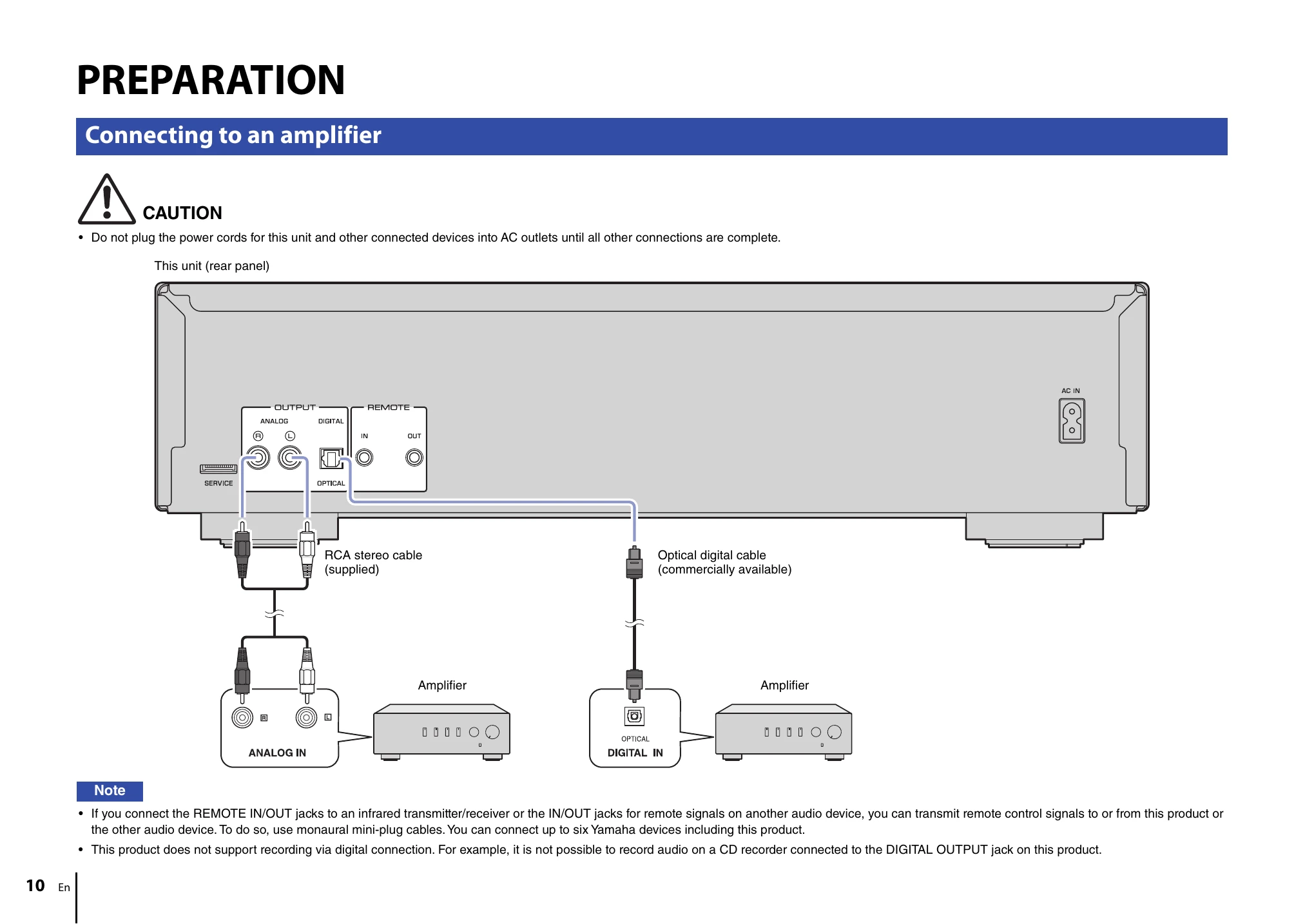
| The unit is not connected to the amplifier properly. | Check the connection to the amplifier. | 10 | |
| Audio is not output from the device connected to the unit's DIGITAL OUTPUT jack. | The PURE DIRECT function is turned on. | Turn the PURE DIRECT function off. | 15 |
| The sound skips. | The unit is affected by vibration or impact. | Change the location of the unit. | — |
| The disc is dirty or scratched. | Wipe off the dirt from the disc surface, or use an unscratched disc. | 24 | |
| Buzzing or hum noise is heard. | The RCA stereo cable is not connected firmly. | Connect the RCA stereo cable firmly. If the symptom does not improve, check to see whether the cable itself is defective. | 10 |
| Noise in the tuner | The unit is located close to the tuner. | Relocate the unit farther away from the tuner, or turn off the power to the unit. | — |
| The disc tray is making noise. | The disc is deformed. | Use a non-deformed disc. | — |
| No indication on the display | The PURE DIRECT function is turned on | Turn the PURE DIRECT function off. | 15 |
| No folder name or file name appears on the information display. | Characters other than one-byte alphanumeric are used for the folder or file name. | Use one-byte alphanumeric characters for the folder and file names. | 18 |
| The remote control does not work or function properly. | The batteries are weak. | Replace all batteries. | 9 |
| Wrong distance or angle. | Use the remote control within the operative range. | 9 | |
| Direct sunlight or lighting (from an inverter type of fluorescent lamp, etc.) is striking the remote control sensor of this unit. | Reposition the orientation of the lighting or the unit. | — |