Brand: YAMAHA
Category: Audio/Video
Document Type: Manual
Language: EN
Brand: YAMAHA
Category: Audio/Video
Document Type: Manual
Language: EN
Uploaded: Nov. 21, 2025, 7:41 p.m.
None
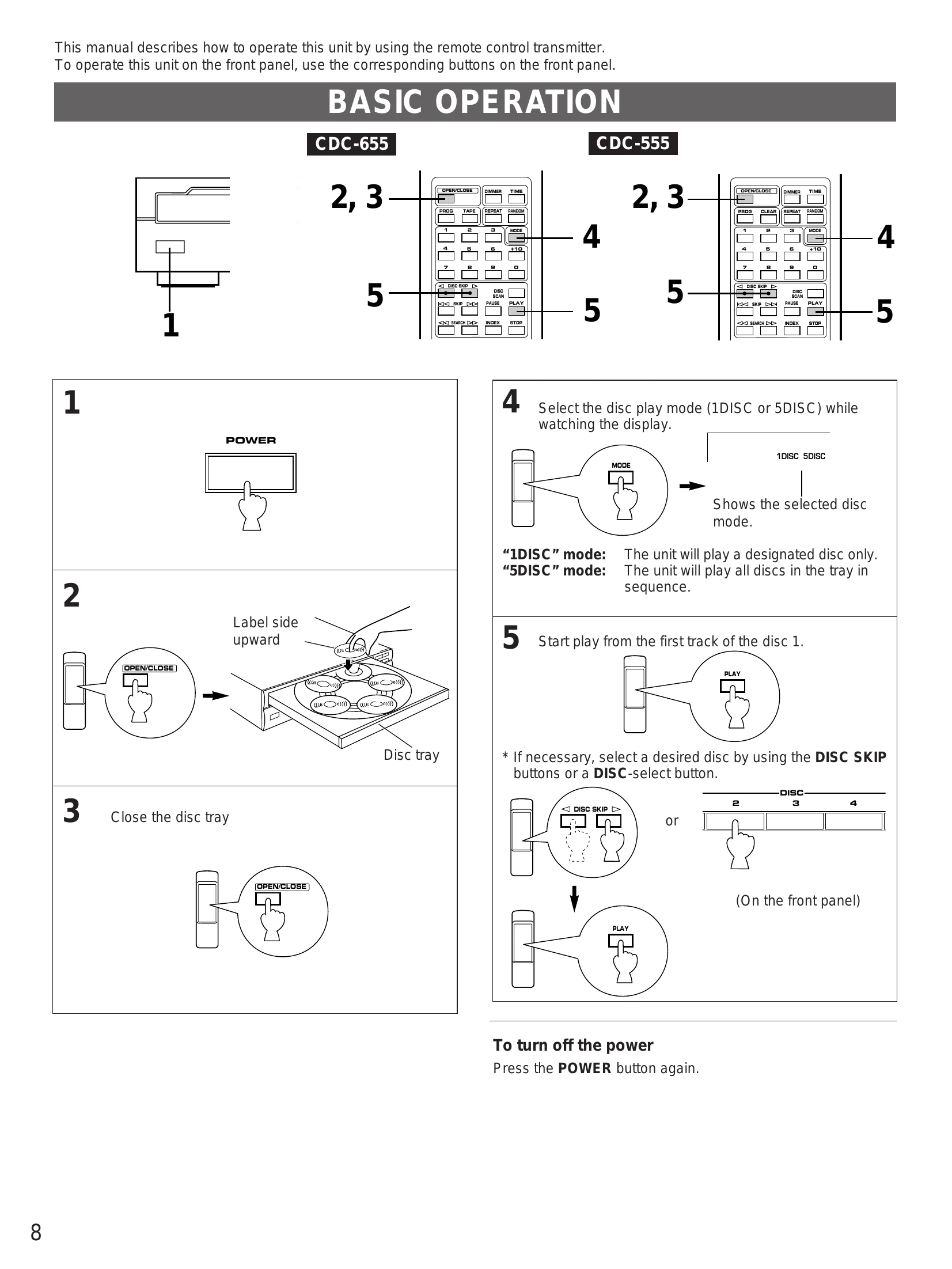
BASIC OPERATION
Other Operations:
| SYMPTOM | PROBABLE CAUSE | REMEDY |
| The player does not switch ON when the POWER switch is pressed. | The power cord is not connected or not completely connected. | Securely connect the power cord. |
| The disc tray does not close completely. | A foreign object is obstructing the tray. | Carefully check the disc tray and remove the foreign object. |
| A disc number does not light up in the display. | The disc has been loaded upside down. | Load the disc correctly. |
| Play does not begin. | The disc is damaged. | Check the disc carefully; replace it if necessary. |
| Play is delayed, or begins at the wrong place. | There is moisture on the laser pickup. | Wait 20 to 30 minutes after switching the unit ON before trying to play a disc. |
| No sound. | Improper output cable connections. | Connect the cables properly. If the problem persists, the cables may be defective. |
| Sound "skips". | This unit is being subjected to vibrations or impacts. | Relocate this unit. |
| Sound "hums". | Improper cable connections. | Securely connect the audio cables. If the problem persists, the cables may be defective. |
| Noise from a nearby tuner. | The tuner is too close to this unit. | Move the tuner and this unit farther apart. |
| Noise from inside of the disc tray. | The disc may be warped. | Replace the disc. |
| The remote control transmitter does not work. | The batteries of this remote control transmitter are too weak. | Replace the batteries with new ones. |
| The remote control transmitter does not work. | Direct sunlight or lighting (of an inverter type of fluorescent lamp etc.) is striking the remote control sensor of the main unit. | Change position of the main unit. |