Brand: YAMAHA
Category: Audio/Video
Document Type: Manual
Language: EN
Brand: YAMAHA
Category: Audio/Video
Document Type: Manual
Language: EN
Uploaded: Nov. 21, 2025, 8:14 p.m.
None
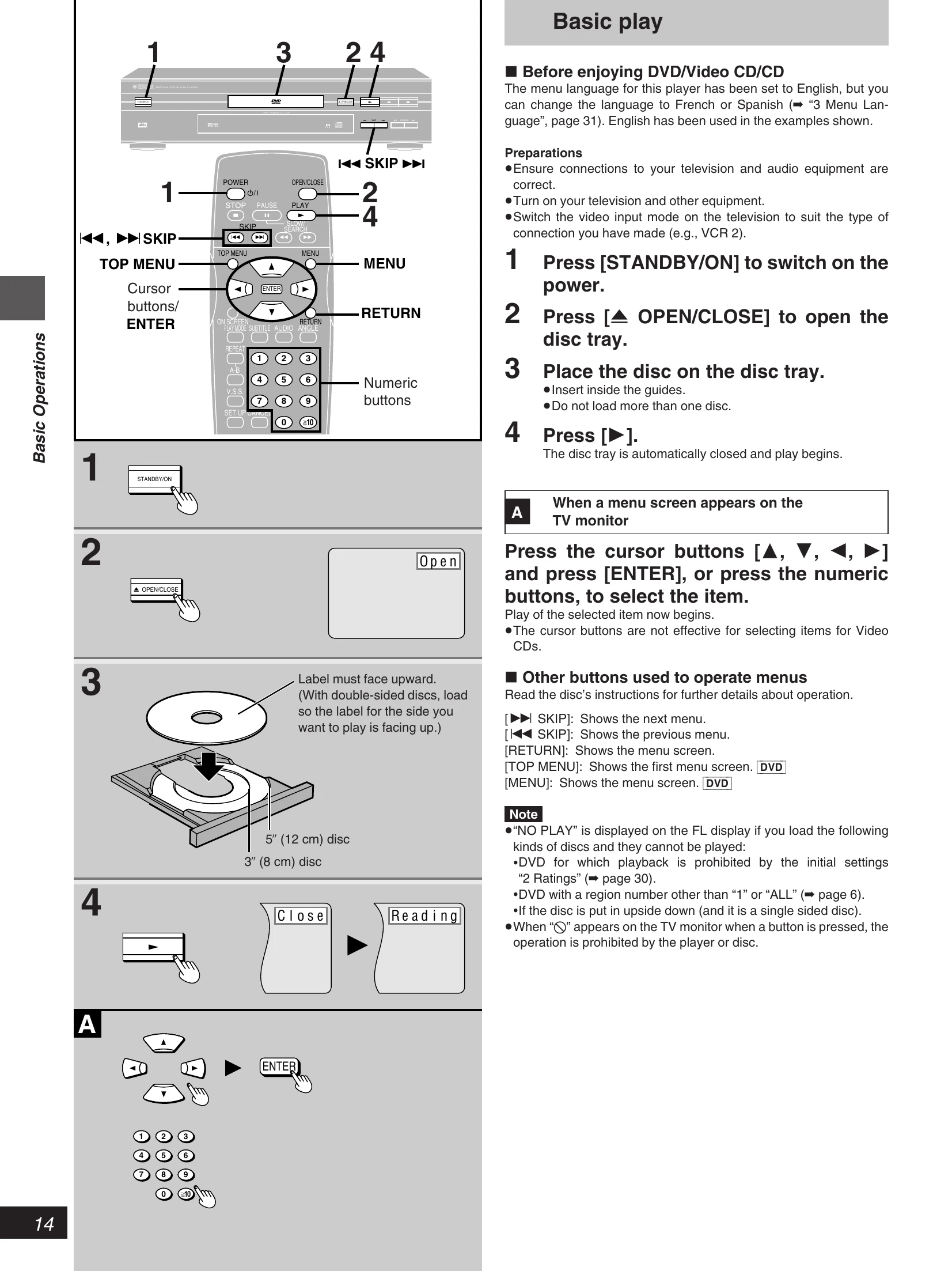
Basic Play:
Using Menus to Play:
Changing Settings:
Troubleshooting:
Check the "Troubleshooting Guide" section for common problems and their solutions. If problems persist, contact a YAMAHA dealer.
| Common Problems | Remedy |
|---|---|
| No power. | Insert the AC power supply cord securely into the household AC outlet. |
| The player is automatically switched to the standby mode. | To conserve power, the player is automatically switched to the standby mode after approx. 30 minutes elapsed in the stop mode (Auto power-off function). Turn the power back to ON. |
| Play fails to start even when [► PLAY] is pressed. | Condensation has formed: wait about 1 to 2 hours for it to evaporate. This player cannot play discs other than DVD, Video CD and CD. DVDs with a region number other than "1" or "ALL" cannot be played. The disc may be dirty and may require cleaning. 38 Ensure that the disc is installed with the label of the side to be played facing upwards. 4 |
| Play starts but then stops immediately. | Ensure that the equipment is connected properly. 12 13 Ensure the television's video input setting (e.g. VCR2) is correct. |
| No picture. | Ensure that the equipment is connected properly. 8-13 Ensure that the input settings for the television and stereo system are correct. |
| No sound. Distorted sound. | Turn V.S.S. off if it is on. 24 27 |
| Picture is distorted during rapid advance or rapid reverse. | The picture will be somewhat distorted at times: this is normal. |
| No key operation (by the player and/or the remote control) is effective. | Some operations may be prohibited by the disc. Press [STANDBY/ON] to switch the player to the standby mode and then back to ON. Alternatively, press [STANDBY/ON] to switch the player to the standby mode, disconnect the AC power supply cord and then reconnect it. (The player may not be operating properly due to lightning, static electricity or some other external factor.) |
| The picture shown on the television is not normal. (The sides of the picture are cut off or black bands appear at the top and bottom of the screen.) | Go to the initial settings menu "6 TV Aspect" and change the setting to suit your television. You may also need to change the screen mode on the television itself. 31 35 |
| No on-screen display. | The "Off" setting is selected for "1 On-Screen Messages" in "4 On-Screen Messages": select "On". 1 |
| On-Screen Menu Icons not displayed or only partially displayed on the TV screen. | Change the position of the On-Screen Menu Icons using "2 Color and Position" in "4 On-Screen Messages" of the initial settings. |
| The language for the player's menus and on-screen messages is wrong. | Go to the initial settings menu "3 Menu Language" and change the language. |
| No operations can be performed with the remote control. | To conserve power, the player is automatically switched to the standby mode after approx. 30 minutes have elapsed in the stop mode (Auto power-off function). Turn the power back to ON. Check the batteries are installed with the correct polarities (+ and -). The batteries are depleted: replace them with new ones. 6 Point the remote control at the remote control sensor and operate. Operate the remote control at a distance of not more than 23 feet (7 m) from the remote control sensor. 5 Remove the obstacles between the remote control and remote control sensor. 5 |