Brand: YAMAHA
Category: Audio/Video
Document Type: Manual
Language: EN
Brand: YAMAHA
Category: Audio/Video
Document Type: Manual
Language: EN
Uploaded: Nov. 21, 2025, 7:52 p.m.
| Problem | Cause | Solution | See page |
|---|---|---|---|
| Receiver does not turn on or enters standby mode after power is applied. | Power cable not connected or plug not fully inserted into the outlet. | Connect the power cable properly. | 18 |
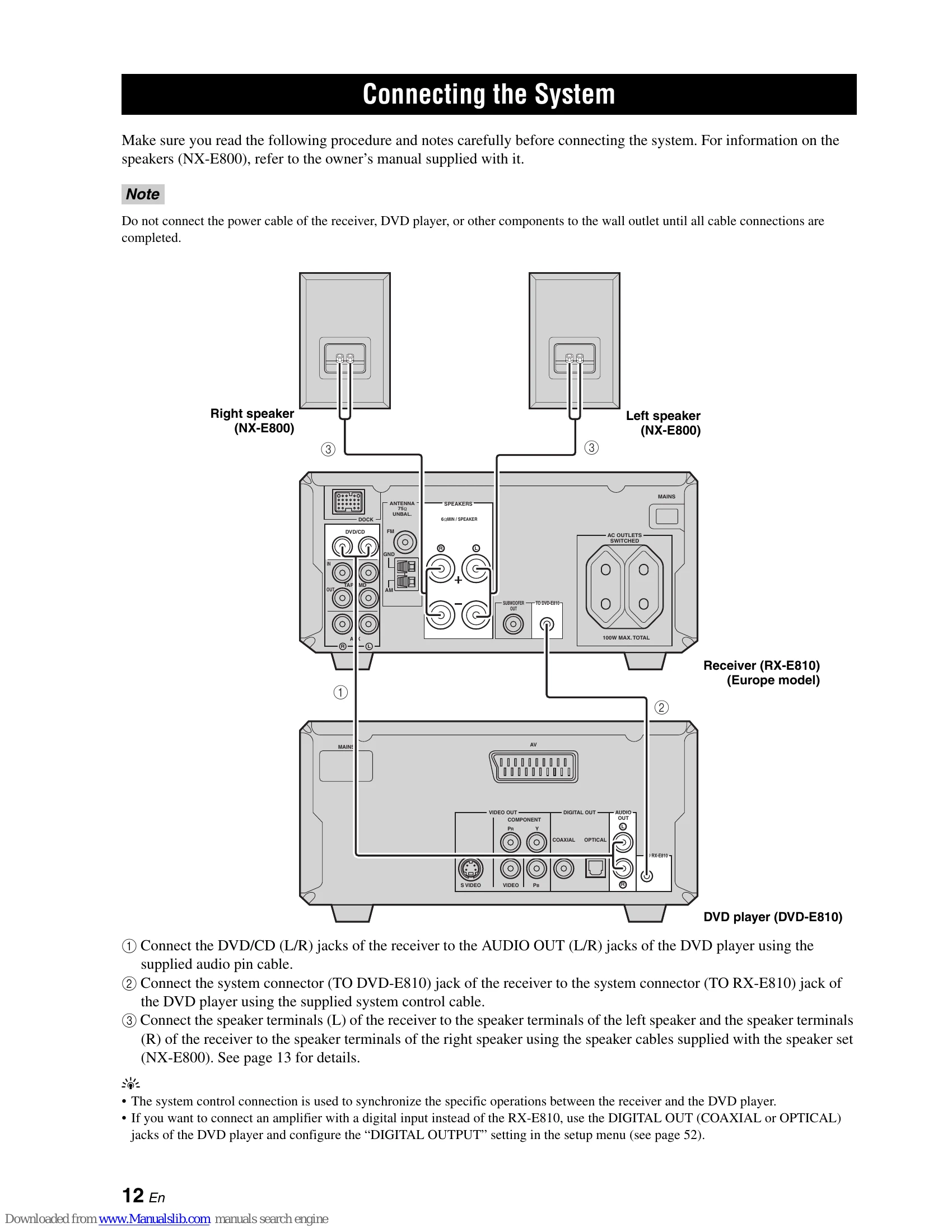
| No sound. | Input/output cables connected incorrectly. | Connect cables properly. If the problem persists, the cables may be defective. | 12 |
| Sudden sound cut-off. | Incorrect input source selected. | Select the appropriate input source using the INPUT selector. | |
| Sound only from one speaker. | Speaker connections are loose. | Connect speakers securely. | 13 |
| Low volume. | Volume level is too low. | Increase the volume level. | |
| No sound or distorted sound. | Signals received from the source component are not compatible (e.g., CD-ROM disc). | Play a source that can be reproduced by the receiver. | |
| Receiver turned off by timer. | Receiver was turned off by the timer. | Turn the receiver on again and restart playback. | 13 |
| Sound from speakers is noisy with crackling or static. | Cables connected incorrectly. | Connect cables properly. If the problem persists, the cables may be defective. | 13 |
| Noise from the unit. | Receiver is too close to digital or radio frequency equipment. | Move the receiver away from such equipment. |
| Problem | Cause | Solution | See page |
|---|---|---|---|
| Noise during stereo FM reception. | Characteristics of the stereo broadcast or weak signal. | Check antenna connections. Use a directional FM antenna. Tune manually. | 15 |
| Distorted sound, poor reception even with a good FM antenna. | Multipath interference. | Adjust antenna positioning to avoid multipath interference. Use a directional FM antenna. Tune manually. | 37 |
| Cannot tune to desired station with auto tuning. | Weak signal from the transmitting station. | Use a directional FM antenna. Tune manually. | 37 |
| Cannot tune to preset stations. | Receiver was disconnected for a long time. | Set preset stations. | 38 |
| Cannot tune to desired station with auto tuning (AM). | Weak signal or loose antenna connection. | Secure AM loop antenna connections and adjust direction for better reception. | 15 |
| Noise with crackling or static (AM). | Interference from lightning, fluorescent lights, motors, thermostats, or other electrical equipment. | Use an external antenna and ground wire. Move the receiver away from the TV. | |
| Noise with humming or buzzing. | A television is being used nearby. | Move the receiver away from the television. |
| Message | Cause | Solution | See page |
|---|---|---|---|
| Loading... | Receiver establishing connection with iPod. | Receiver reading song lists from iPod. | |
| Connect error | Problem during signal transfer from iPod to receiver. | Disconnect and reconnect the YAMAHA iPod universal dock to the receiver's DOCK terminal. Reset the iPod. | 17 |
| Unknown type | Unsupported iPod. | Only iPod (Click and Wheel), iPod nano, and iPod mini are supported. | |
| iPod connected | iPod correctly docked and connected. | Reconnect the iPod to the YAMAHA iPod universal dock. | 17 |
| Disconnected | iPod removed from the dock. | Reconnect the iPod to the YAMAHA iPod universal dock. | 17 |
| Unable to play | Receiver cannot play songs on iPod. | Ensure songs on iPod are playable. Save other playable music files on the iPod. |
| Problem | Cause | Solution | See page |
|---|---|---|---|
| Unit does not turn on or turns off immediately. | Power cable not connected or plug not fully inserted into the outlet. | Connect the power cable properly. | 18 |
| Unit turns off immediately during playback. | Receiver cannot receive playback signal from DVD player within 30 minutes, triggering auto standby. | Check the system control cable connection between the receiver and DVD player. | 12 |
| Incorrect image on TV (monitor). | Component video output setting does not match video connection. | Set "COMPONENT" on the DVD player to match the connection method. | 54 |
| Strange screen size or aspect ratio (image distorted or no subtitles). | DVD player's color system setting does not match the TV's specifications. | Check the TV's color system and set "TV TYPE" on the DVD player accordingly. | 53 |
| Progressive scan mode is enabled, but the TV does not support it. | Progressive scan mode is enabled, but the TV does not support it. | Set "PROGRESSIVE" to "OFF". | 54 |
| Playback of a disc may be incompatible. | Disc may be incompatible with the DVD player. | Ensure the disc is compatible with the DVD player. | 63 |
| Picture may be slightly distorted depending on the disc. | This is not a malfunction. | Set the DVD player's screen size parameter to match the TV, or check the TV's screen size settings. | 53 |
| No sound or distorted sound. | MP3 or WMA file sampling rate may not match the DVD player. | Check if the MP3 or WMA file's sampling rate and bit rate match the DVD player. | 63 |
| Digital cables connected incorrectly. | Digital cables connected incorrectly. | Connect digital cables properly. | 16 |
| No sound from digital output. | Playback disc may be incompatible. | Ensure the disc is compatible with the DVD player. | 63 |
| Cannot set digital output settings correctly. | Cannot set digital output settings correctly. | Set the "DIGITAL OUTPUT" parameter on the DVD player to match the external audio equipment connections. | 52 |
| Disc does not play. | Incomplete CD-R/RW, DVD+R/RW, or DVD-R/RW disc. | Finalize the CD-R/RW, DVD+R/RW, or DVD-R/RW disc. | |
| Disc installed upside down. | Disc installed upside down. | Ensure the disc is installed with the label side up. | |
| Disc may be defective. | Disc may be defective. | Try playing another disc. If the problem does not recur, the disc may be defective. | |
| JPEG or MP3/WMA disc may not contain enough graphic files or music tracks. | JPEG or MP3/WMA disc may not contain enough graphic files or music tracks. | Check if the JPEG or MP3/WMA disc contains at least 10 graphic files or 5 music tracks. | 63 |
| MP3/WMA file sampling rate and bit rate may not be supported. | MP3/WMA file sampling rate and bit rate may not be supported. | Check if the MP3/WMA file's sampling rate and bit rate are supported. Check if JPEG resolution is supported. | |
| JPEG resolution may not be supported. | JPEG resolution may not be supported. | Check if the JPEG resolution is supported. | |
| Disc regional code may not be supported. | Regional code of the disc may not be supported by the DVD player. | Check the regional code. | |
| Disc may be dirty. | Disc may be dirty. | Check for fingerprints/scratches on the disc and wipe it with a dry cloth from the center outwards. | 64 |
| Lens may be dirty. | Lens may be dirty. | Clean the lens using a lens cleaner. | 64 |
| Cannot enable or disable progressive scanning. | Component video output setting does not match video connection. | Set "COMPONENT" on the DVD player to match the connection method. | 54 |
| No sound during DivX movie playback. | Audio codec may not be supported by the DVD player. |
| Problem | Cause | Solution | See page |
|---|---|---|---|
| Remote control does not operate properly. | Too far away or incorrect angle. | Remote control operates within 6 m (20 feet) and a 30° angle from the front panel sensor. | 11 |
| Direct sunlight or lighting on the remote control sensor. | Direct sunlight or lighting on the remote control sensor. | Change the system's location. | |
| Low battery power. | Low battery power. | Replace all batteries. | 11 |
| Remote control code set incorrectly. | Remote control code set incorrectly. | Set the remote control code correctly using the "Remote Control Code List" at the end of this manual. | 48 |
| Even if the remote control code is set correctly, some models may not respond to the remote control signals. | Even if the remote control code is set correctly, some models may not respond to the remote control signals. | Try setting another code for the same manufacturer using the "Remote Control Code List" at the end of this manual. | 48 |