Manual for PW3000M

Manual for PW3000M

Brand: YAMAHA

Category: Audio/Video

Document Type: Manual

Language: EN
Uploaded: Nov. 21, 2025, 6:38 p.m.

Warranty Information

Warranty information is not explicitly stated but implied by standard product practices.

  • Connect the power supply cord to a compatible AC outlet.
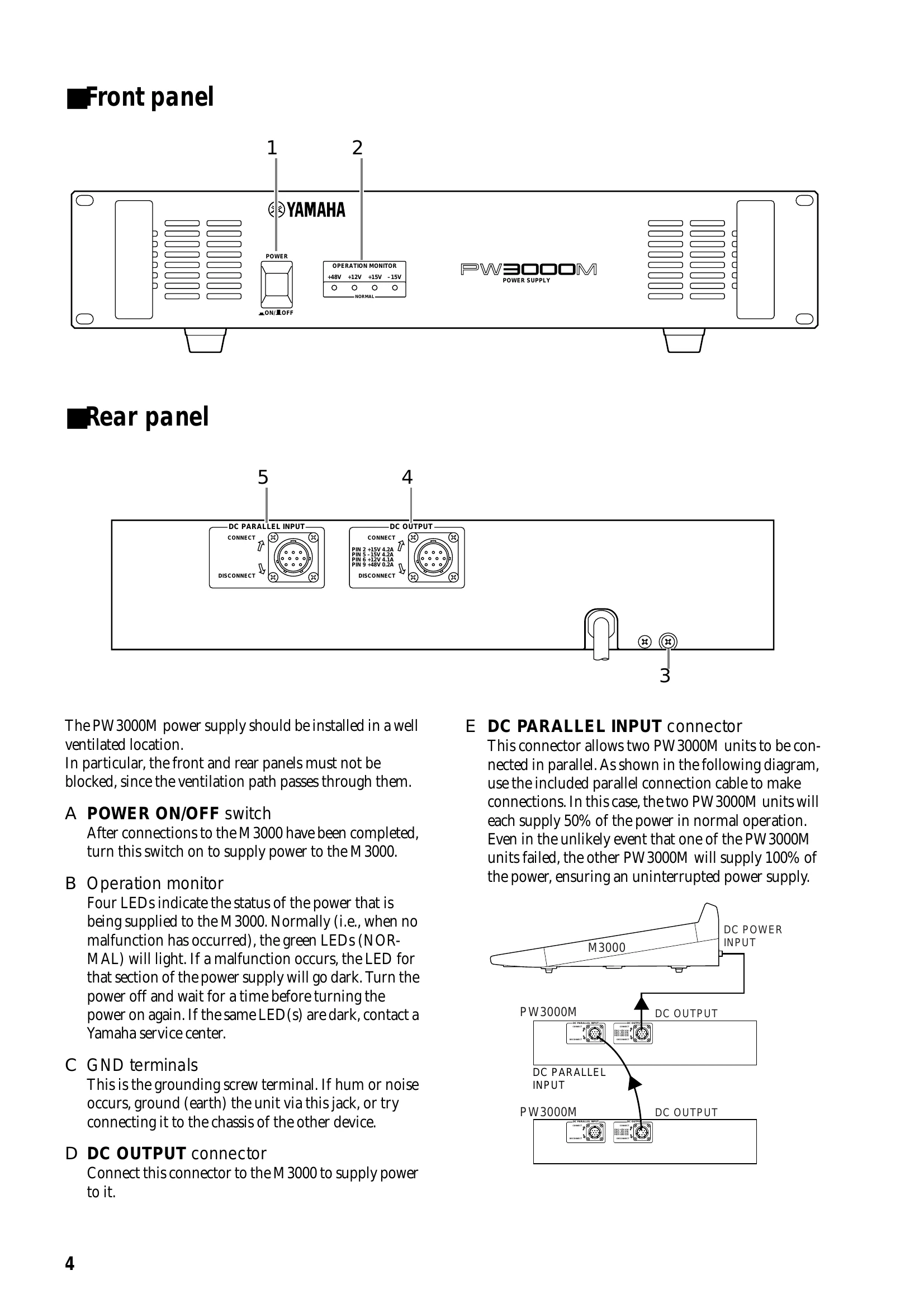
  • Use the POWER ON/OFF switch to turn the unit on after making connections to the M3000.
  • The Operation monitor LEDs indicate the power status. Green LEDs indicate normal operation. If a malfunction occurs, the corresponding LED will go dark. Turn off the unit and consult a service center if the issue persists.
  • Connect the DC OUTPUT connector to the M3000 to supply power.
  • The DC PARALLEL INPUT connector allows two PW3000M units to be connected in parallel for a redundant power supply.
  • Ensure the unit is installed in a well-ventilated location, with the front and rear panels unobstructed.
  • The operating temperature range is between 5°C and 35°C (41°F and 95°F).
  • Turn off audio devices before connecting or disconnecting the power supply unit.
  • If smoke, odor, or unusual noise is detected, turn off the unit immediately and disconnect the power cord. Consult your dealer for repair.
  • If foreign objects or water enter the unit, turn it off immediately, disconnect the power cord, and consult your dealer.
  • If the unit will not be used for an extended period, remove the power cord from the AC outlet.
  • Clean the unit with a soft, dry cloth only. Do not use solvents or chemical cleaners.
  • This unit uses high-frequency digital circuits that may cause interference with radios and televisions. Relocate affected equipment if necessary.

Troubleshooting and error codes

TroublePossible CauseRemedy
No power Power cord is not plugged in. Plug the power cord firmly into the AC outlet.
No power Power cord is damaged. Ask your dealer for a replacement power cord.
No power POWER ON/OFF switch is OFF. Turn the POWER ON/OFF switch ON.
No power Internal fuse blown. Consult your dealer for service.
Hum or noise Unit is not properly grounded. Ground the unit using the GND terminal.
Hum or noise Interference from other equipment. Relocate the unit or the interfering equipment.
Operation monitor LEDs are dark Malfunction in the power supply section. Turn the power off, wait, and turn it on again. If the LEDs remain dark, contact a Yamaha service center.
Privacy Policy