Brand: YAMAHA
Category: Audio/Video
Document Type: Manual
Language: EN
Brand: YAMAHA
Category: Audio/Video
Document Type: Manual
Language: EN
Uploaded: Nov. 21, 2025, 8:43 p.m.
Manual Publish Date: 2023-01-01
Refer to the "QUICK REFERENCE GUIDE" or Yamaha website for warranty details.
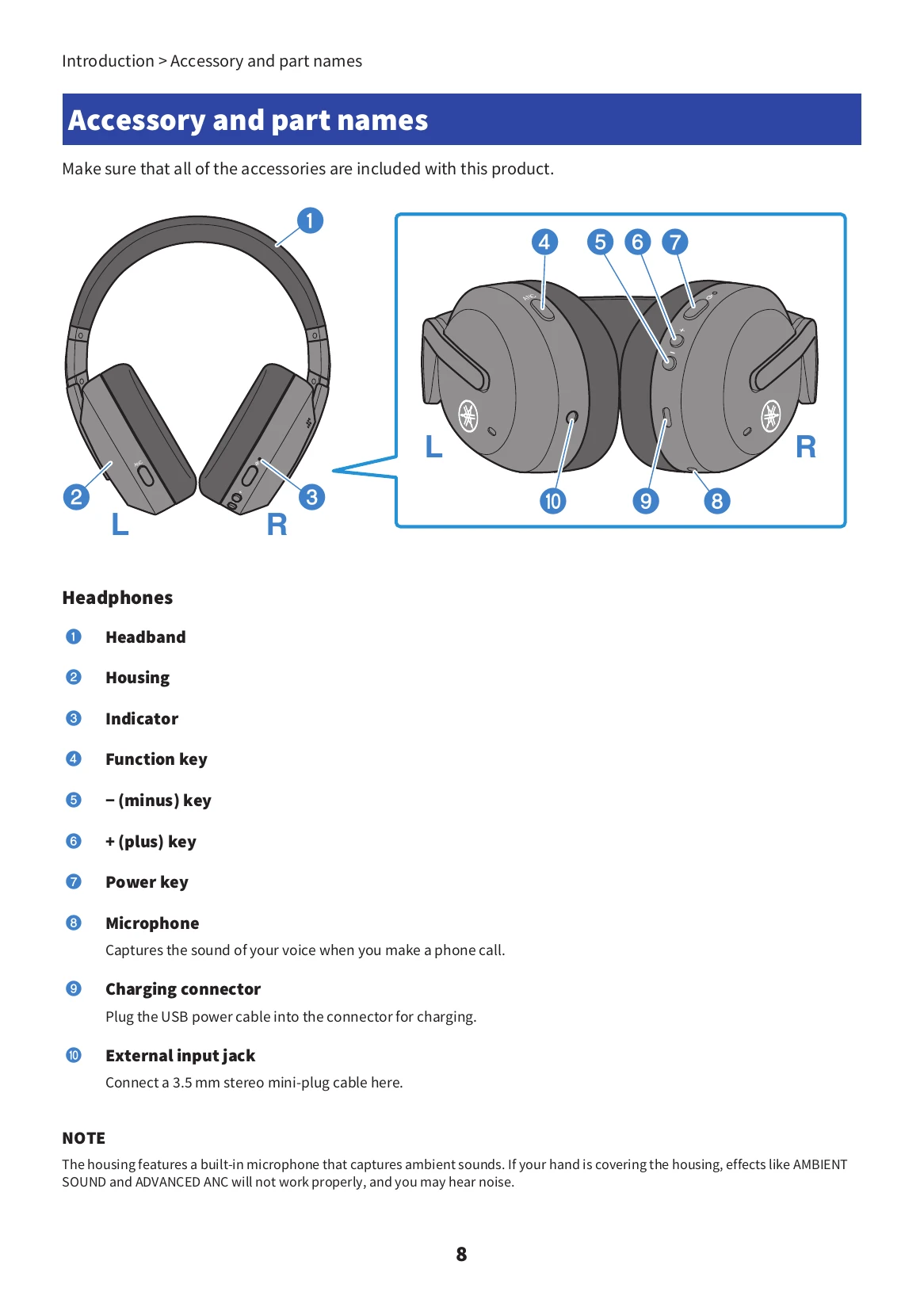
Powering On/Off: Hold the power key for three seconds.
Volume Control: Use the + and - keys.
Audio Playback: Press the power key to pause/play. Hold + to skip to the next track, hold - to go to the previous track.
Ambient Sound/ANC: Press the function key once to cycle through OFF, AMBIENT SOUND, and ADVANCED ANC.
Voice Assistant: Press the power key twice to start/stop.
Charging: Connect the USB power cable to the headphones and a power source. The indicator turns red during charging and off when complete.
| Trouble | Possible Cause/Solution |
|---|---|
| Cannot connect |
|
| Power will not turn on |
|
| Cannot be charged |
|
| Does not operate or play back |
|
| No sound can be heard |
|
| Sound only from one headphone |
|
| Sound is not good or sounds strange |
|
| Sound is distorted, noisy, or choppy |
|