Brand: Yashica
Category: Camera
Document Type:
Language: EN
Brand: Yashica
Category: Camera
Document Type:
Language: EN
Uploaded: Aug. 9, 2025, 11:45 p.m.
No warranty information found in the manual.
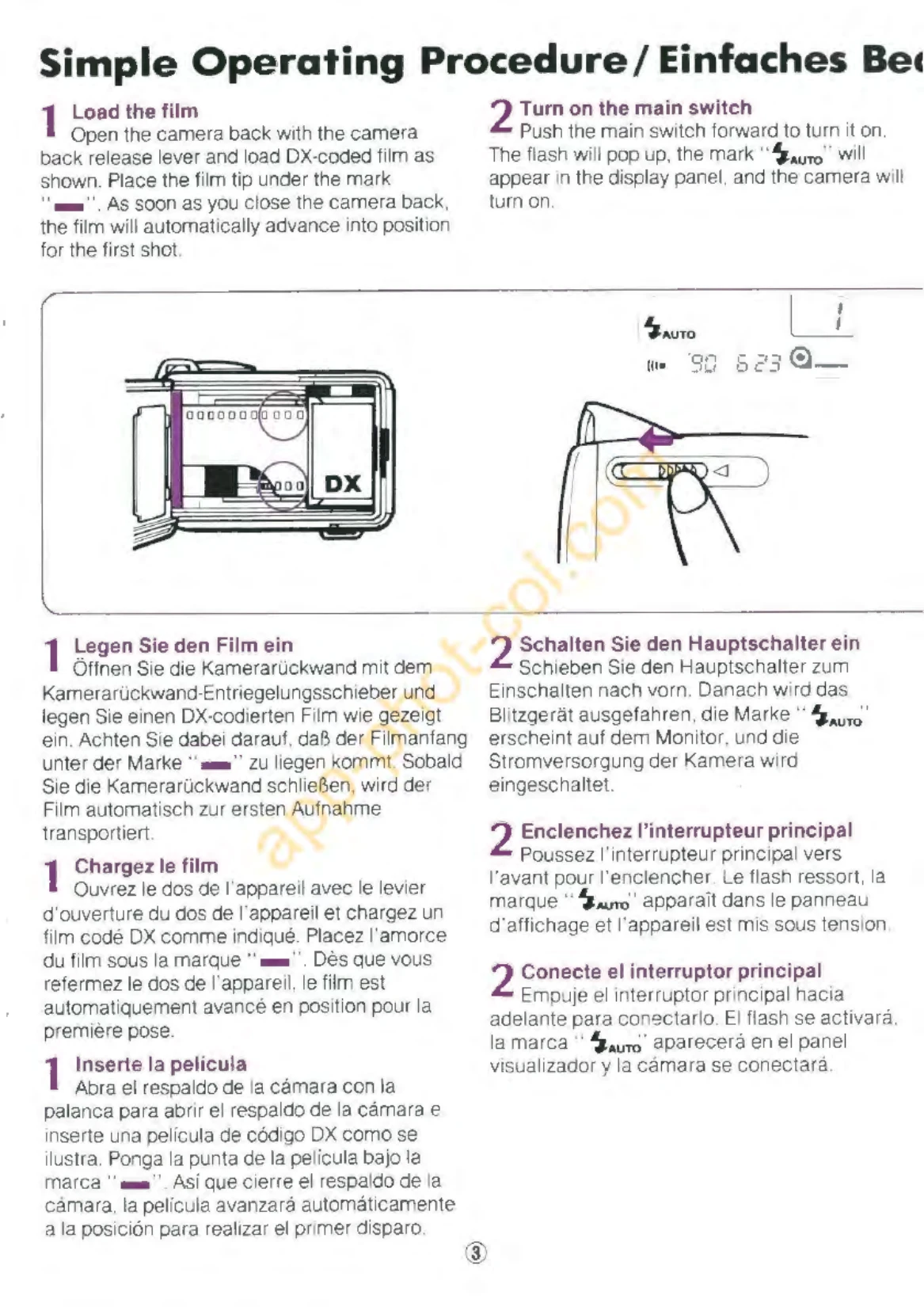
Loading the Film: Install DX-coded film, close the camera back. The camera automatically sets film speed and advances to the first frame.
Turning on the Camera: Push the main switch forward. The flash pops up, "AUTO" appears on the display, and the camera is ready.
Holding the Camera: Grip gently, place forefinger on shutter/zoom lever, support with other hand. Keep body stable, relax shoulders.
Focus and Shoot: Aim focusing frame, depress shutter halfway. "Beep" and green lamp indicate sharp focus. Depress shutter fully to shoot.
Automatic Flash: In dim light, red lamp in viewfinder indicates flash will fire. Depress shutter fully.
| Problem | Possible Cause | Solution |
|---|---|---|
| Red lamp blinks in viewfinder (focusing) | Possibility of camera shake | Hold camera steady. |
| Green lamp blinks (focusing) | Lens not correctly focused. | Use Focus Lock. |
| Exposure counter does not move from "0", "Q" mark blinks | Film not advancing properly. | Open camera back, load film correctly again. |