Manual for 12 XP

Manual for 12 XP

Brand: Zenith

Category: Camera

Document Type:

Language: EN
Uploaded: Aug. 9, 2025, 11:37 p.m.

Manual Publish Date: null

Warranty Information

null

\n

Loading the Camera

\n
    \n
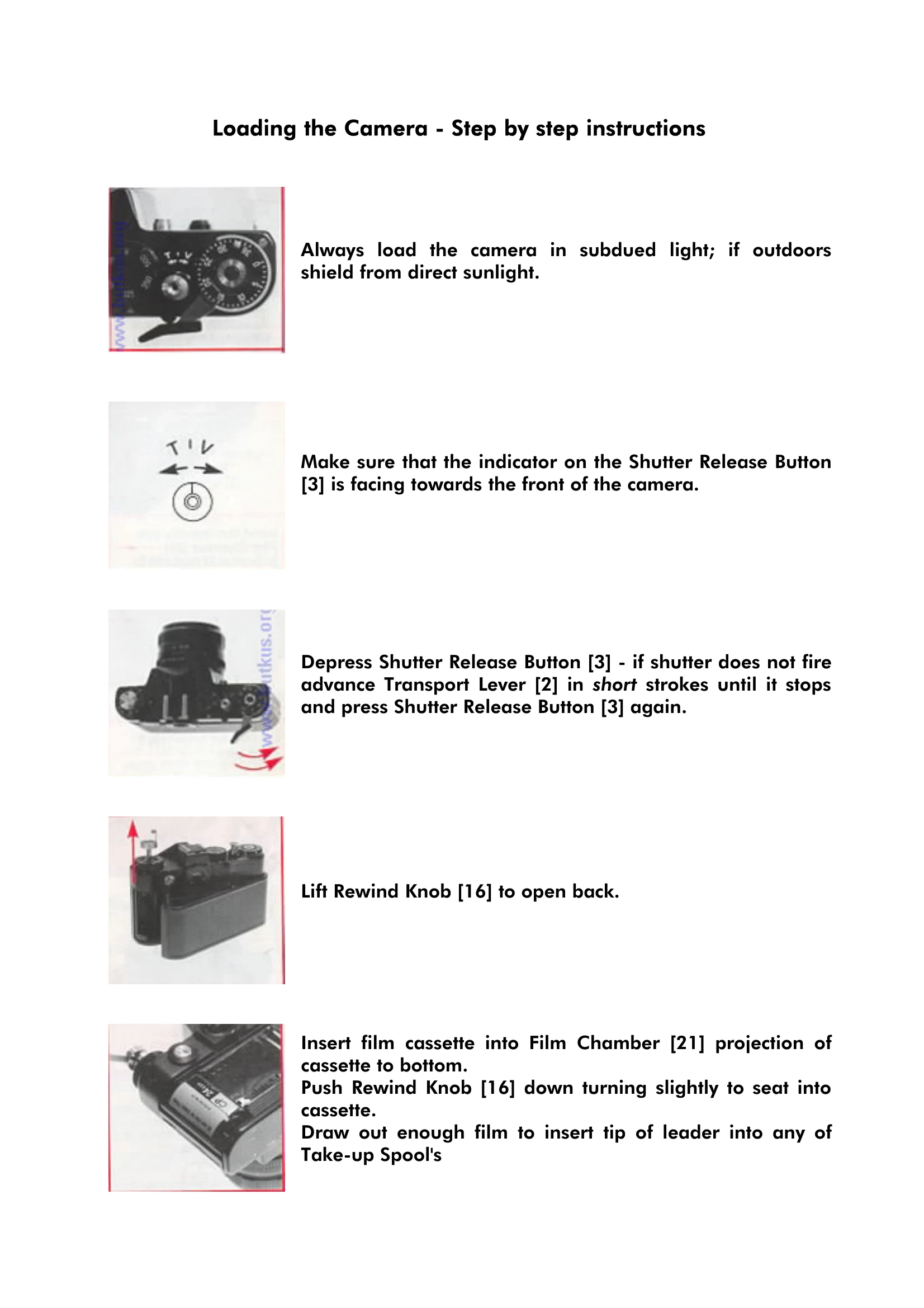
  1. Load in subdued light, shielding from direct sunlight if outdoors.
  2. \n
  3. Ensure the Shutter Release Button indicator faces forward.
  4. \n
  5. Depress the Shutter Release Button; if it doesn't fire, advance the film transport lever slightly until it stops, then press the release again.
  6. \n
  7. Lift the Rewind Knob to open the back.
  8. \n
  9. Insert the film cassette into the Film Chamber with the projection at the bottom.
  10. \n
  11. Push the Rewind Knob down, turning slightly to seat the cassette.
  12. \n
  13. Draw out enough film to insert the leader's tip into the Take-up Spool slots, ensuring the second hole engages a spool tooth.
  14. \n
  15. Ease the film forward with short strokes of the Transport Lever until it stops. Ensure lower sprocket teeth are engaged.
  16. \n
  17. Tighten the film on the Take-up Spool by turning its base flange counter-clockwise, or in the cassette by turning the Rewind Knob clockwise until resistance is felt.
  18. \n
  19. Close the camera back until it clicks, then complete the wind-on if necessary until the Transport Lever stops.
  20. \n
  21. Fire the shutter and advance the film again. Set the Frame Counter to zero.
  22. \n
  23. Set the Film Speed Selector Dial to the appropriate film speed.
  24. \n
\n\n

Using the Camera

\n
    \n
  1. Set the Speed Dial according to the subject. For outdoors, suggest a speed of at least 1/125th sec.
  2. \n
  3. Focus by looking through the Viewfinder and turning the Focusing Ring until the subject is sharp. Use the inner ring for critical focus.
  4. \n
\n\n

Using the Meter

\n
    \n
  1. Focus on the subject and set the Lens Aperture Ring (e.g., f/8).
  2. \n
  3. Press the Shutter Release Button halfway to switch on the meter.
  4. \n
  5. Observe the red lights: upper light indicates over-exposure (turn aperture clockwise), lower light indicates under-exposure (turn aperture anti-clockwise).
  6. \n
  7. Turn until both lights flash rapidly in sequence for correct exposure.
  8. \n
  9. If consistent flashing isn't possible, adjust the Shutter Speed Dial and repeat.
  10. \n
\n\n

Photography with Flash

\n
    \n
  1. Set the Speed Dial to \"30-X\". The aperture is determined by the camera-to-subject distance.
  2. \n
  3. Remove the shield from the Accessory Shoe.
  4. \n
  5. Mount the flashgun in the accessory shoe or on a bracket, connecting the lead to the Flash Sync. Socket.
  6. \n
  7. Set the Aperture Ring according to the flashgun's instructions.
  8. \n
  9. Switch on the flashgun, wait for the \"ready\" light, focus, and shoot.
  10. \n
  11. Replace the accessory shoe cover after use.
  12. \n
\n\n

Changing the Batteries

\n
    \n
  1. Place a coin in the Battery Cover slot and turn anticlockwise to open. Remove the cover and old batteries.
  2. \n
  3. Fit two new batteries with "+" outwards. Replace the cover and lock it.
  4. \n
  5. Handle batteries with a clean cloth to avoid contact issues.
  6. \n
\n

Troubleshooting and error codes

Header 1 Header 2 Header 3 Header 4
Data 1A Data 1B Data 1C Data 1D
Data 2A Data 2B Data 2C Data 2D
Data 3A Data 3B Data 3C Data 3D
Privacy Policy