Brand: Zenza Bronica
Category: Cameras
Document Type:
Language: EN
Brand: Zenza Bronica
Category: Cameras
Document Type:
Language: EN
Uploaded: Aug. 9, 2025, 11:44 p.m.
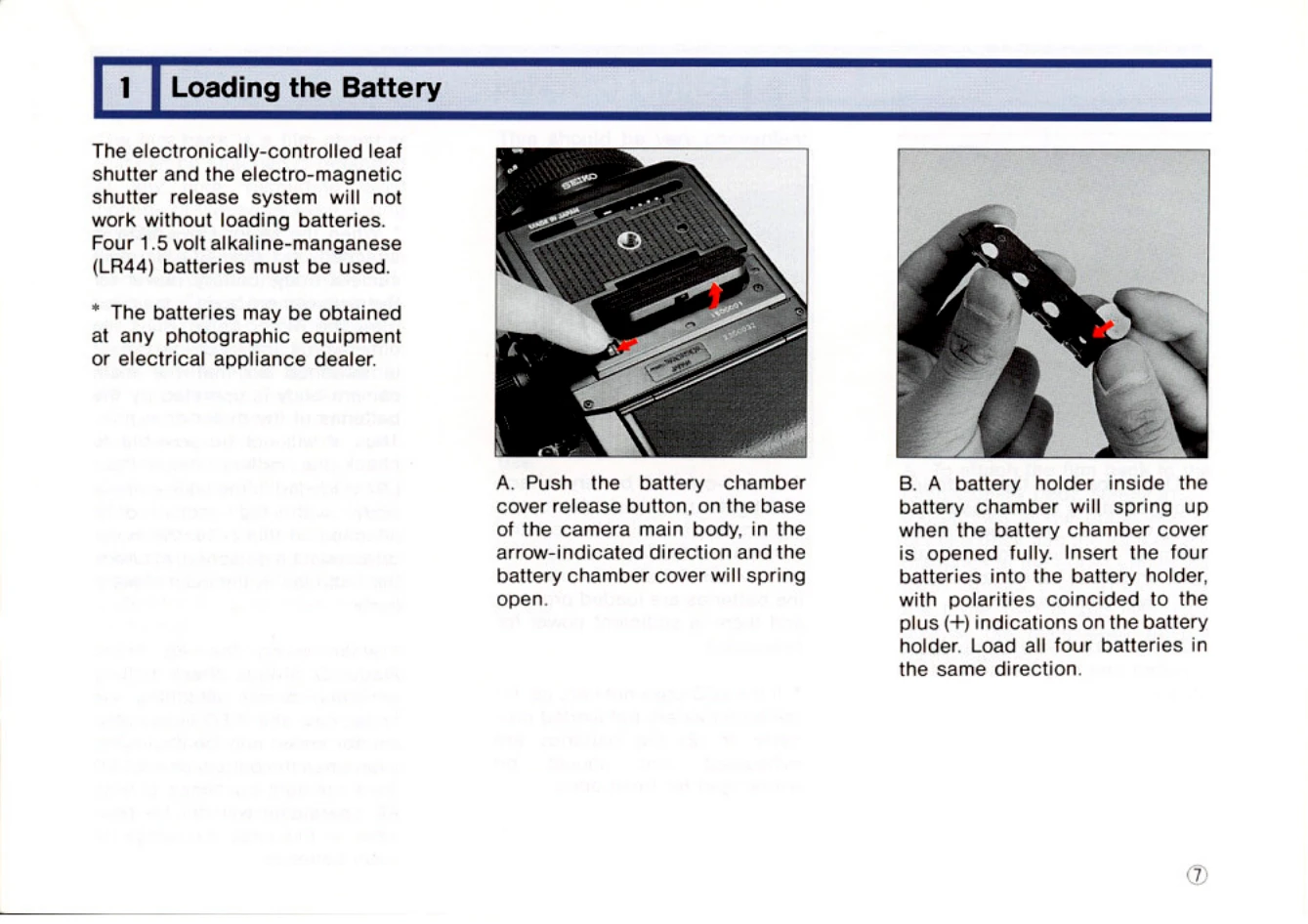
Loading the Battery:
1. Push the battery chamber cover release button to open the cover.
2. Insert four 1.5V LR44 batteries into the holder, ensuring correct polarity (+).
3. Insert the battery holder into the chamber and close the cover.
Battery Checking:
Press the battery check button. A red LED will light up if batteries are properly loaded and have sufficient power.
Attaching/Removing Film Backs:
1. Attach: Insert the latches of the film back into the openings on the camera body and press the lower end until it locks.
2. Remove: Insert the dark slide, depress the film back release button, and slide the film back upwards.
Film Loading:
1. Open the back cover by releasing the buttons.
2. Take out the film holder.
3. Load fresh film onto the spool holders, ensuring correct placement.
4. Draw out the film leader and secure it to the take-up spool.
5. Align the film starting mark with the triangle mark.
6. Close the back cover and wind the crank until the first frame is ready.