Brand: ZTE
Category: Cell Phone
Document Type:
Language: EN
Brand: ZTE
Category: Cell Phone
Document Type:
Language: EN
Uploaded: Aug. 9, 2025, 11:59 p.m.
Manual Publish Date: 2016-09-20
No explicit warranty period is mentioned in the provided pages.
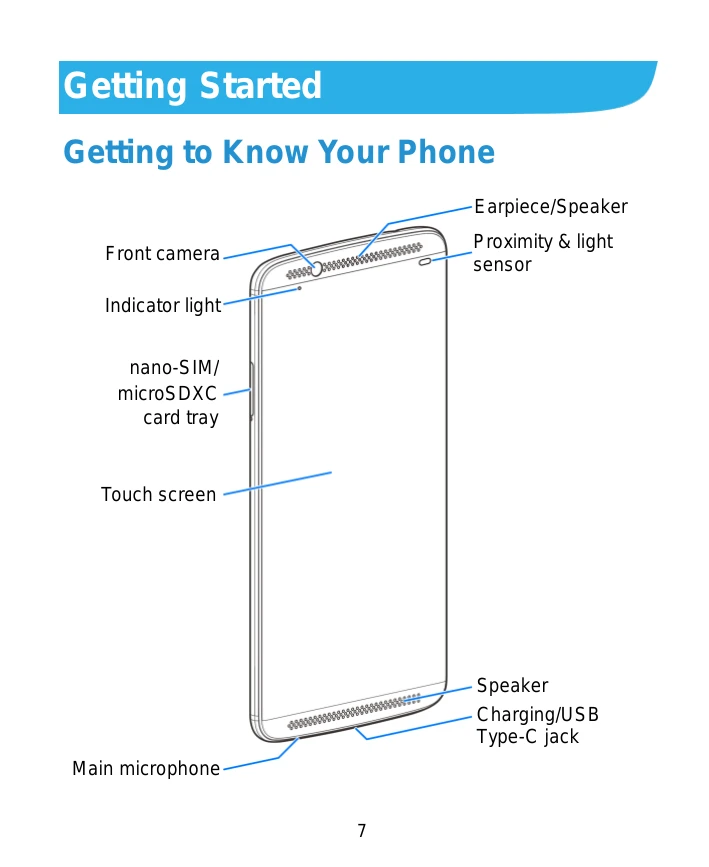
Getting to Know Your Phone: Familiarize yourself with the physical components of your Axon 7 Mini, including the front and back cameras, Earpiece/Speaker, Proximity & light sensor, nano-SIM/microSDXC card tray, touch screen, main microphone, speaker, charging/USB Type-C jack, headset jack, auxiliary microphone, volume key, power key, dual-flash, and fingerprint sensor.
Knowing the Keys: Understand the function of each key: Power key (on/off, airplane mode, vibration, restart, shut down, screen display), Volume key (adjust volume), Home key (return to home screen, Google Search), Back key (previous screen, voice command), and Recent apps key (view recent apps).
Installing SIM Cards: Learn how to insert nano-SIM cards and a microSDXC card, noting the correct orientation and handling precautions.
Charging the Battery: Understand how to charge your phone using the provided ZTE-approved charger and USB Type-C cable. Be aware of charging icons and low battery warnings.
Using the Touch Screen: Master basic touch gestures such as touch, touch and hold, swipe or slide, drag, and pinch for navigation and interaction.
Home Screen: Explore the home screen as the central hub for your phone's functions and learn how to customize it with panels, widgets, and folders.
Do Not Disturb Mode: Learn to silence interruptions by setting up Do Not Disturb mode, including scheduling and exceptions.
Wallpapers and Themes: Customize your phone's appearance by setting new wallpapers for the home and lock screens, and applying different themes.
Screen and Sound Locks: Protect your phone with various screen lock methods, including PIN, pattern, complex password, and voiceprint (Sound Lock).