Brand: ZTE
Category: Cell Phone
Document Type:
Language: EN
Brand: ZTE
Category: Cell Phone
Document Type:
Language: EN
Uploaded: Aug. 10, 2025, midnight
Manual Publish Date: 2021-04-09
None
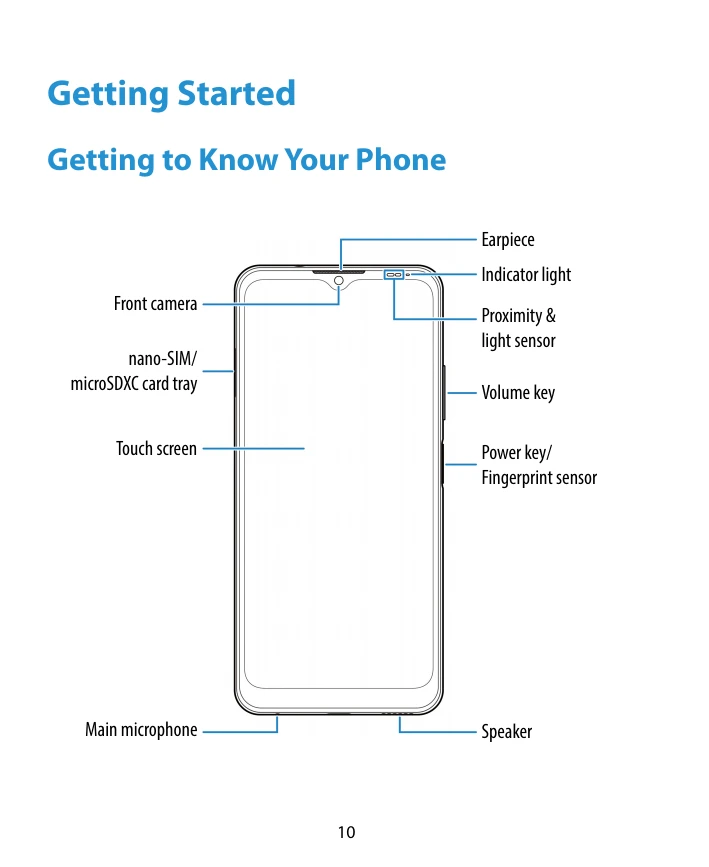
Getting to Know Your Phone: Familiarize yourself with the physical components of your phone, including the front and back cameras, earpiece, indicator light, sensors, buttons, and ports.
Key Functions: Understand the functions of the Power key, Volume key, Home key, Recent apps key, and Back key for navigation and device control.
Installing a nano-SIM Card and Optional microSDXC Card: Learn how to safely insert and remove SIM and microSDXC cards using the provided tray eject tool.
Charging the Battery: Instructions on connecting the charger to the phone and a power outlet, and recognizing the charging icon.
Powering Your Phone On/Off: Steps for turning the phone on and off, including a note on restarting if the screen freezes.
Setting Up Your Phone for the First Time: Guidance on the initial setup process after purchasing or resetting the phone.
Locking/Unlocking the Screen and Keys: How to lock the phone to conserve battery and unlock it when needed, with options for screen lock methods.
Getting to Know the Home Screen: An overview of the home screen layout, including widgets, shortcuts, folders, and the navigation bar.