Brand: ZTE
Category: Cell Phone
Document Type:
Language: EN
Brand: ZTE
Category: Cell Phone
Document Type:
Language: EN
Uploaded: Aug. 10, 2025, midnight
Manual Publish Date: 2020-11-20
Warranty information is not explicitly stated in this section of the manual.
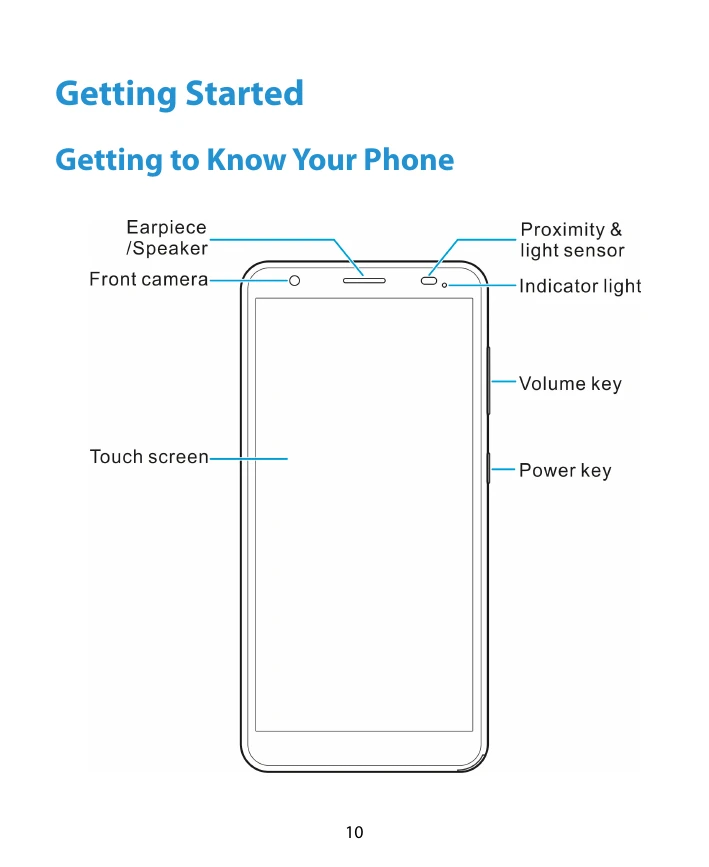
Getting to Know Your Phone: Familiarize yourself with the phone's components like the earpiece, front camera, touch screen, volume keys, power key, and sensors.
Key Functions: Learn the functions of the Power key, Volume key, Home key, Recent apps key, and Back key. The phone also supports gesture navigation.
Installing SIM and microSDXC Card: Learn how to install a nano-SIM card and an optional microSDXC card. Ensure you use the correct card type and follow the provided instructions for insertion and securing the cover.
Installing the Battery: Follow the steps to install the battery by aligning the contacts and gently pushing it into place. Ensure the cover is securely fastened.
Charging the Battery: Connect the phone to a standard AC power outlet using a ZTE-approved charger and USB cable. Fully charge the battery as soon as possible for optimal performance.
Powering On/Off: Press and hold the Power key to turn the phone on or off. To turn it off, press and hold the Power key to access the options menu.
Setting Up Your Phone: Upon first use or after a factory reset, follow the on-screen prompts to select the language and complete the setup.
Locking/Unlocking the Screen: Press the Power key to quickly lock the screen and keys. To unlock, press the Power key and swipe up on the screen, or use other unlock methods if set.
Getting to Know the Home Screen: The home screen is your main interface. You can customize it with shortcuts, folders, and widgets. Extended home screen panels offer more space.
| Issue | Possible Solution |
|---|---|
| Phone does not power on even when charging (battery extremely low) | Try again after charging for at least 20 minutes. Contact customer service if the issue persists. |
| Harmful interference to radio or television reception | Reorient or relocate the receiving antenna; increase separation between equipment and receiver; connect equipment to a different circuit. Consult dealer or technician if needed. |
| Disabling device due to unauthorized modifications | Changes or modifications not approved by the manufacturer may void the user's authority to operate the equipment. |
| Antenna use restrictions | Antennas must not be co-located or operating in conjunction with any other antenna or transmitter. |
| Potential hearing device interference | Users may detect buzzing or humming. Test the phone with your hearing device in different locations. Consult service provider for more information. |
| Battery damage or swelling | Stop use immediately and contact ZTE or an authorized service provider for replacement. |
| Risk of explosion from battery | Do not disassemble, puncture, throw battery into fire, or use wrong battery model. |
| Phone overheating during charging or use | Avoid placing the phone near heating equipment or direct sunlight. Disconnect charger when fully charged. |
| Damage from small children | Keep phone and accessories out of reach of small children due to small parts, sharp edges, and choking hazards. |
| Demagnetization risk | Keep electronic devices or magnetic media away from the phone for extended periods. |