Manual for BLADE A3Y

Manual for BLADE A3Y

Brand: ZTE

Category: Cell Phone

Document Type:

Language: EN
Uploaded: Aug. 9, 2025, 11:59 p.m.

Manual Publish Date: 2020-05-11

Warranty Information

ZTE Corporation provides a warranty for this device, and information about it can be found on the ZTE official website.

Getting Started

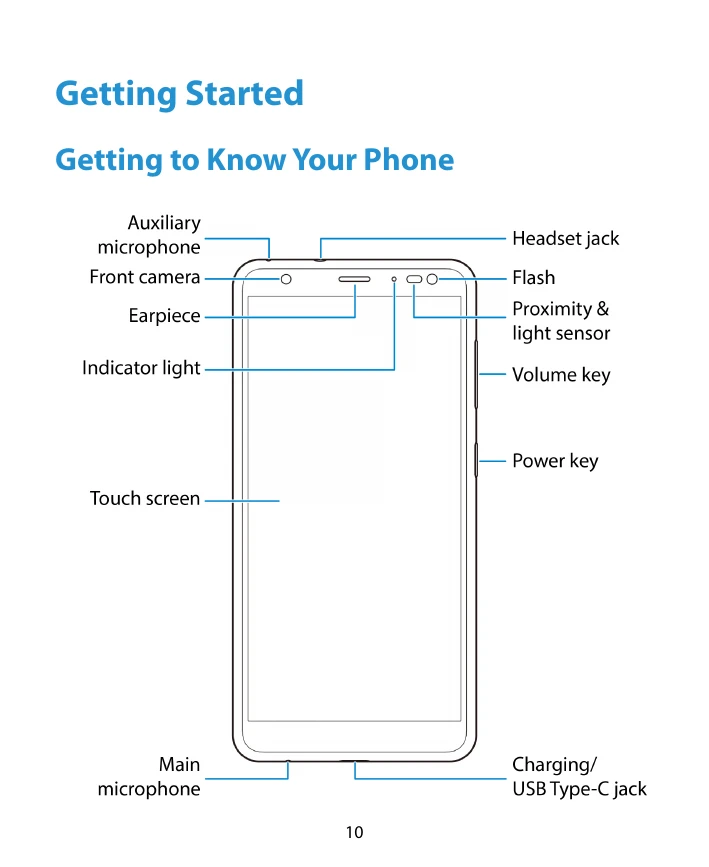
  • Get to Know Your Phone: Familiarize yourself with the phone's physical buttons, ports, and screen layout.
  • Key Functions: Understand the purpose of the Power key, Volume key, Home key, Recent apps key, and Back key.
  • Install SIM and microSDXC Card: Learn how to insert a nano-SIM card and an optional microSDXC card.
  • Install Battery: Follow steps to install the battery.
  • Charge Battery: Connect the phone to a charger using a USB Type-C cable and a standard AC outlet.
  • Power On/Off: Press and hold the Power key to turn the phone on or off.
  • Setup: Follow on-screen prompts to set up your phone after the first power-on or reset.
  • Lock/Unlock: Press the Power key to lock the screen. Unlock using the Power key, swipe, or other methods if security is enabled.
  • Home Screen: Learn to navigate and customize your home screen with shortcuts, folders, and widgets.

Personalizing

  • System Language: Change the phone's display language.
  • Date and Time: Set the date, time, and time zone.
  • Sounds: Customize ringtones, notification sounds, and alarm sounds.

Troubleshooting and error codes

Problem Solution
Phone does not power on even when charging. Charge for at least 20 minutes. If still not powering on, contact customer service.
Screen or camera lens is slow or interferes with image quality. Keep the screen and camera lens clean.
Interference with other electronic devices (e.g., pacemakers, hearing aids). Maintain a minimum separation distance and consult device manufacturers.
Phone overheating. Avoid excessive heat and direct sunlight. Disconnect charger when fully charged.
Battery issues (swelling, leakage). Stop use immediately and contact ZTE or authorized service provider.
Privacy Policy