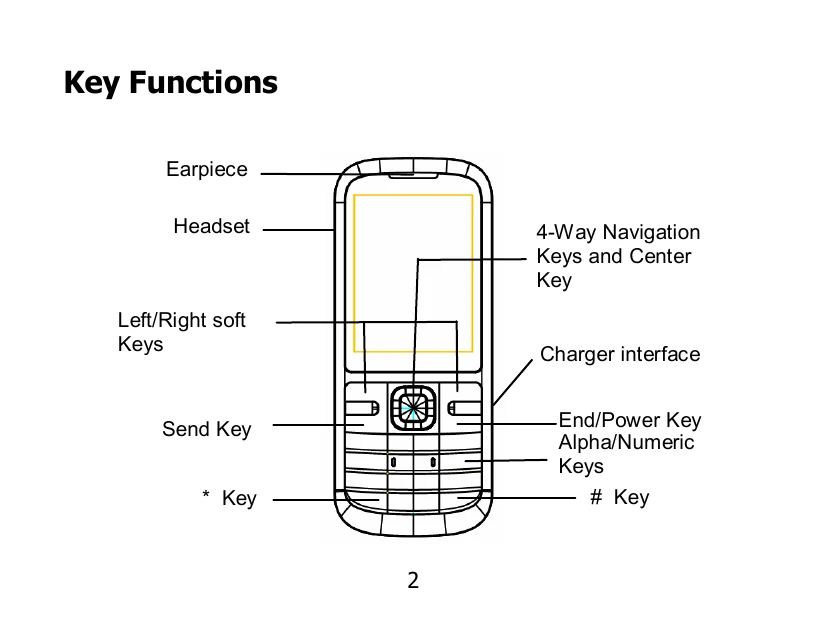
Key Functions: Familiarize yourself with the earpiece, headset, soft keys, send key, end/power key, alpha/numeric keys, and navigation keys.
Locking/Unlocking: Press the Left soft key then the '*' key to lock the keypad. The same action unlocks it.
Battery: The lithium-ion battery can be used immediately after unpacking. Follow the instructions to install or remove the battery.
SIM/SD Card: Insert the SIM card and memory card with the phone switched off and charger disconnected. Ensure correct orientation and contact placement.
Charging: Connect the travel adapter to the phone and then to the mains socket. Disconnect when fully charged.
Text Input: Learn how to change input modes, input letters, digits, symbols, and spaces. Use the 'C' key to delete characters.
Phonebook: Add contacts via Menu > Phonebook > Add new contact. You can also save numbers from calls or messages. Delete contacts via Options > Delete.
Calls: Make calls by dialing or selecting from the Phonebook. Answer by pressing the Send key. End or reject calls with the End/Power key.
Messages: Send and receive SMS/MMS messages. View messages in the Inbox. Reply, delete, or forward from the open message view.
Call Center: Access call history (dialed, received, missed) and call settings (call waiting, divert, barring) via Menu > Call center.
Security: Protect your phone by setting PIN codes, handset lock codes, and call restrictions.