Brand: ZTE
Category: Cell Phone
Document Type:
Language: EN
Brand: ZTE
Category: Cell Phone
Document Type:
Language: EN
Uploaded: Aug. 10, 2025, midnight
Manual Publish Date: 2021-01-09
None
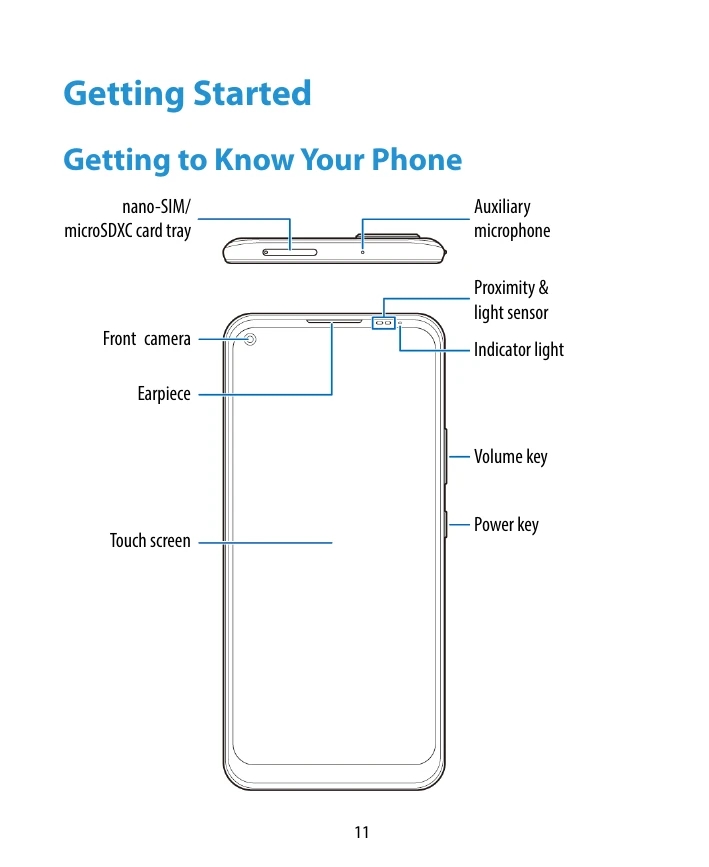
Familiarize yourself with your phone's layout, including keys and ports. Learn how to insert SIM and microSD cards, charge the battery, and power the device on/off. Initial setup involves selecting language and following on-screen prompts.
Customize your phone by changing system language, date, and time. Adjust ringtones, notification sounds, and volumes. Explore options like silent/vibration mode, Do Not Disturb, and applying new wallpapers. Secure your device with a screen lock.
Connect to mobile networks and Wi-Fi. Pair Bluetooth devices and exchange data via NFC. Connect your phone to a computer via USB for file transfer. Use the microSDXC card for storage.
| Header 1 | Header 2 | Header 3 | Header 4 |
|---|---|---|---|
| Row 1 Data 1 | Row 1 Data 2 | Row 1 Data 3 | Row 1 Data 4 |
| Row 2 Data 1 | Row 2 Data 2 | Row 2 Data 3 | Row 2 Data 4 |
| Row 3 Data 1 | Row 3 Data 2 | Row 3 Data 3 | Row 3 Data 4 |