Brand: ZTE
Category: Network Router
Document Type:
Language: EN
Brand: ZTE
Category: Network Router
Document Type:
Language: EN
Uploaded: Aug. 10, 2025, midnight
Manual Publish Date: 2020-01-01
Warranty does not cover defects caused by user actions, external factors, or unauthorized modifications.
Introduction: The ZTE MF928 is a 4G LTE mobile hotspot. Connect devices via Wi-Fi to access data services.
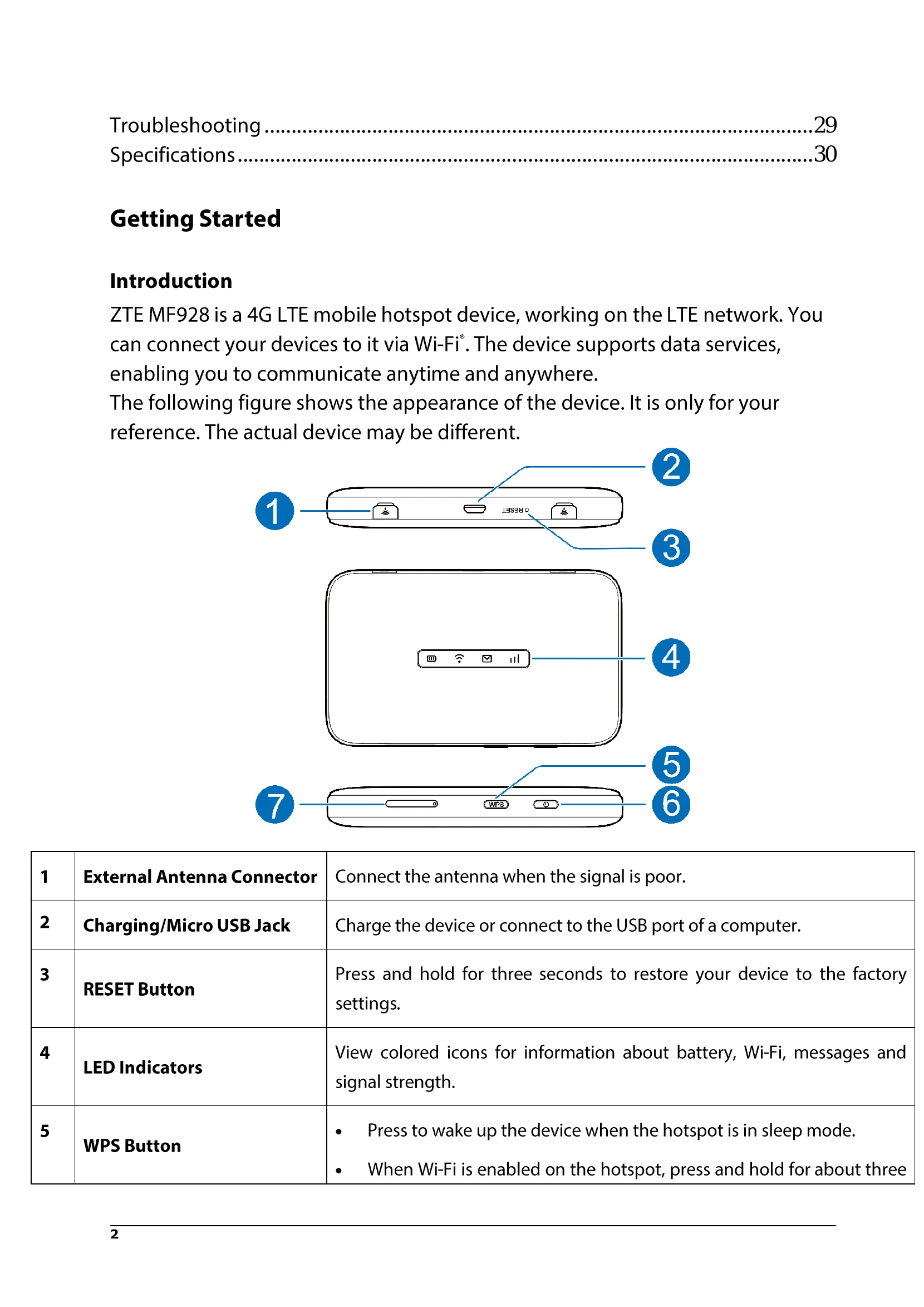
Device Overview: The device has an External Antenna Connector, Charging/Micro USB Jack, RESET Button, LED Indicators, and a WPS Button. It also has a Power Button and a nano-SIM Card Tray.
Indicators: LEDs display battery status, Wi-Fi connectivity, messages, and network signal strength.
Setting Up: Install the nano-SIM card and power on the device. Charge the device for over two hours initially.
Accessing the Internet: Connect via Wi-Fi using the default SSID and password found on the device label, or via a micro-USB cable.
Configuration: Access the web interface using the Device Manager Website IP address and WebUI password from the device label.
| Problem | Suggested Solution |
|---|---|
| Cannot establish the Wi-Fi connection between the MF928 device and your Wi-Fi enabled device. |
• Make sure the Wi-Fi function is active. • Refresh network list and select the correct SSID. • Check the IP address to make sure your device can obtain an IP address automatically in the Internet protocol (TCP/IP) properties. • Type the correct network key (Wi-Fi password) when you connect to the MF928 device. |
| Your connected device cannot access the Internet. |
• Make sure your nano-SIM card is installed. • Change the location to find a place with a good signal. • Make sure the APN is correct. Contact your service provider to obtain the APN and add it manually. |
| Cannot access the web configuration page. |
• Enter the correct address. The default address is http://192.168.1.1. • Only use one network adapter in your PC. • Do not use any proxy server. |